New post
Avatar
0

I'm using Finale 26.2.1.464 on Mojave 10.14.6.

I just downloaded v. 26, and this is my first song. I set the initial playback to quarter note = 72. At measure 16, I insert a tempo mark to set quarter note = 94. At measure 22, during playback, the tempo self-adjusts back to quarter note = 72. I have no expressions at measure 22.

This has happened several times. I tried changing the initial playback tempo; that caused a spontaneous tempo change at measure 3. I found the conversation here called "tempo marks won't hold" and tried everything that it suggested, even to the point of removing all of the measures in the second half of the song and typing it all in again. (I use the simple entry tool.)

Why does the tempo self-adjust? More importantly, how can I get it to stop doing that?

Thanks!

--Dave

13 comments

Date Votes
Avatar
0

There may be hidden midi data which affect the tempo. Select the region, Edit menu -> Clear Selected Items  -> None -> Midi Data.

Comment actions Permalink
Avatar
0

Thanks for the suggestion. Since this is a brand-new file, all hand-entered using the Simple Entry tool, I doubted that there would be hidden midi data. But I did as you suggested, and it made no difference.

Also, the problem moves around, as I mentioned, according to the setting of the playback tempo. If I set the playback tempo to quarter note = 94, and then add a tempo adjustment to measure 1 to say quarter-note = 72, it works until measure 3. There the tempo self-adjusts to 94.

Comment actions Permalink
Avatar
0

The best way to find out would be if we could examine the file (even emptied of notes). Unfortunately, Finale files cannot be uploaded here.

If you could place your file somewhere and give us a link, we could take a look at it.

Comment actions Permalink
Avatar
0

OK, here is a link to a web page that contains a link to the file. You'll have to right-click on the link to download the file.


Thanks for the offer!

Comment actions Permalink
Avatar
0

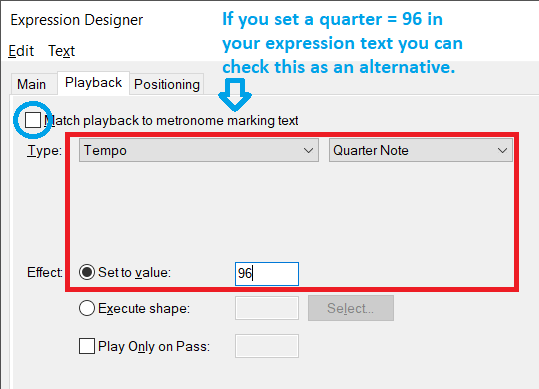
How are you setting your tempo? The preferred way is to use expressions, where you can use the Playback tab to enter details.


Comment actions Permalink
Avatar
0

I’m using an expression, but a little differently. If you go into the standard expressions dialog (hit the mf button on the toolbar) and go to the Tempo Marks section, there is a sample tempo setting expression (quarter note = number) there. I duplicate it, change the number, and use that.

And it really does work. But only for a few measures. 

Comment actions Permalink
Avatar
0

I'm examining your file right, strange indeed.

Comment actions Permalink
Avatar
0

Starting the playback at meas. 17 (2nd measure in 94) already has a slower tempo. It is already abnormal.

Comment actions Permalink
Avatar
0

I can't think of a cause...

After several tests, I found out that it is only after deleting the half note in measure 22 that the problem disappeared.

The problem seems to be associated with that half note. After clearing it up, the tempo went back to normal.

Why remains a mystery.

Comment actions Permalink
Avatar
0

Yes. Take away that half note, the tempo problem goes away. Put the half note back, the tempo problem returns. But it's not just that half note. As I've said before, the problem moves around.

I guess I'll take it to tech support. If I learn anything useful, I'll put it back in this thread. Thanks.

Comment actions Permalink
Avatar
0

Suppose you insert a measure stack, and delete the existing one. Can you enter the half note with no problems, then?


And regardless if it’s a new file or not, I would still clear the MIDI data.

Comment actions Permalink
Avatar
0

I did try that - I deleted the measure stack. The tempo then worked properly. When I added a new measure with a half note, the problem returned immediately.

And I did clear all of the MIDI data. Didn't help, unfortunately.

Comment actions Permalink
Avatar
0

I reached out to MakeMusic technical support. Their conclusion was that my file had been internally corrupted, in the area of Human Playback. "the issue is being caused Human Playback improperly interpreting the document". It had nothing to do with the way I entered notation or expressions.

The solution was to do a MusicXML export and then import. I did, and the tempos are now working as they should.

Thanks to the tech support staff at MakeMusic.

Comment actions Permalink

Please sign in to leave a comment.