Windows 10, Version 25.5.0.290
Can Finale split the symbol of a multi measure rest so the the number is in the middle of symbol as opposed to above it, e.g., /------ 8 ------/


No. Being non-standard, you'd have to enter that as a graphic — pretty easy.
Start here to see your options for Multimeasure Rests.
http://usermanuals.finalemusic.com/FinaleMac/Content/Search.htm?q=multimeasure%20rest
Since it isn't an acceptable way of doing these, your score must have an explanation as to why. Otherwise, the performers waste time wondering what you really mean by that. Sometimes, non-standard expressions are the only way to express what you want, ergo the Graphics tools. You can hide the real notation and rests for playback.
If your aim is merely to show off how clever you are, please don't.

This number was done as a shape expression.
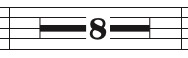
The real multimeasure rest number was moved way down below the bottom of the page.
In that way the number will not print.
The shape expression contains the number, and a rectangle.
The rectangle has zero line thickness, is filled with white, and is sent to back so that the rectangle is behind the number.
If you have any questions, let me know
Please sign in to leave a comment.
2 comments
Date Votes