New post
Avatar
0

I'm using version 25.05

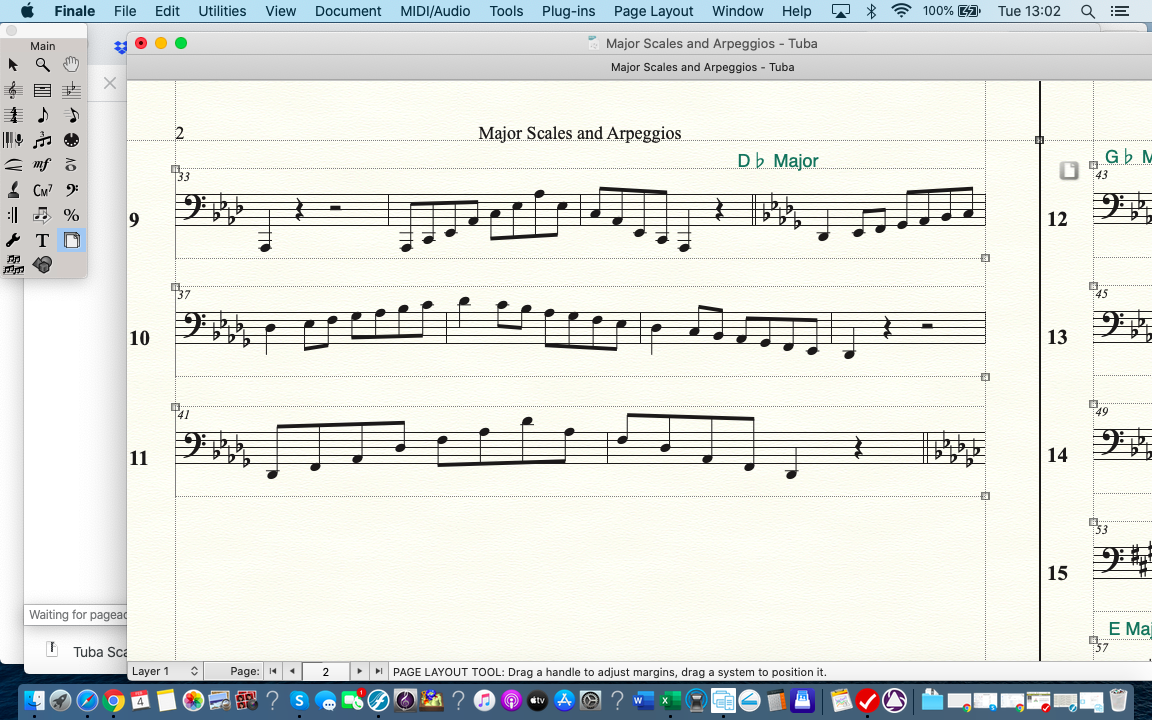
I have a document that no matter what I try won't allow me to have more than three staves on ONLY the second page. The following pages have ten staves each and they look fine.

Help, PLEASE!

3 comments

Date Votes
Avatar
0

My first guess would be that the culprit is a Page Break.

Switch to the Page Layout Tool, go to Page 3, and look for a “Page Break” icon at the left end of the top system.

Select the top system on Page 3, and go to

Page Layout menu > Delete Page Break

Comment actions Permalink
Avatar
0

I don't see any icon at all.

Comment actions Permalink
Avatar
0

Look closer, left to system 12. Peter's solution is the way to go.

(P.S. : in Finale's jargon, you should use the word "system", rather than staves. There is only 1 staff in this piece, but several systems, visible in page view).

Comment actions Permalink

Please sign in to leave a comment.