New post
Avatar
0

HI everyone,

I'm using the newest version of Finale, Windows 10.

I'm composing some snare drum pieces and I'm trying to get the darn beams to go over the ornaments. I put in a help request for Finale about this many days ago but haven't heard back. Perhaps you can help me.

I'm in 5-8 and I want to be able to group the beams different ways depending on the bar, so sometimes it's 2 + 3 other times 3 + 2, but no matter how it is beamed there are times where I need the notes have ornaments attached to them (flams or ruffs, etc) and I need the beam to go over the ornament, but it won't work, it keeps putting everything as separate eighth notes, which looks ridiculous.

And, so long as you're helping me, I also followed this tutorial https://www.rpmseattle.com/of_note/creating-aleatoric-temporal-boxed-notation-in-finale-part-1/  on how to import box notation and smart lines for aleatoric music. I got the boxes to appear, but the smart lines won't work. I've tried loading the library multiple times, but when I click on the custom shapes icon under the smart shapes menu nothing happens.  Arrgggghhhhhh . . . . .

Help!

Thanks so much!!


9 comments

Date Votes
Avatar
0

In Speedy you can use the / key to toggle a beam to be attached or broken.I'm not sure which keystroke does this in Simple, maybe the same one.

Comment actions Permalink
Avatar
0

thanks, Jeffrey. I enter all my music with Speedy entry so I'm familiar with that function, but it doesn't work.

Comment actions Permalink
Avatar
0

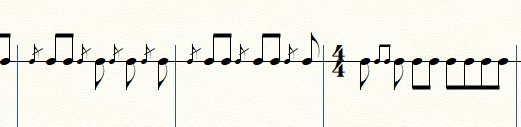
Can you post a screen shot of the problem? Is this similar to what you need?

Comment actions Permalink
Avatar
0

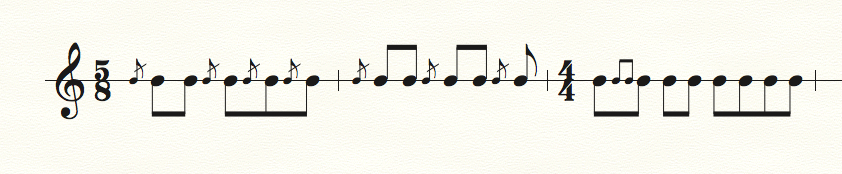
Yes, that's exactly what I'm trying to do. I never had problems with this in my old version of Finale, not sure why it won't work now. You'll see in the first measure below that I want that measure grouped 2 + 3, with flams before the three eighth notes, beats 3 - 5. And then same idea in the next measure, which should also be grouped 2 + 3. Thanks so much for your help.

Comment actions Permalink
Avatar
0

I'm not sure what to suggest. I had no problem creating this example by simply using the / key to beam the notes together.

Comment actions Permalink
Avatar
0

Yes, I just tried it again and it still won't work. Was never a problem with the older version of Finale. I emailed tech support a week ago and haven't heard anything back. Very frustrating that I spent several hundred dollars on an upgrade that is working less well than the previous version and I can't get tech support. Arggh!!!

Comment actions Permalink
Avatar
0

No problem here, either. I just entered the hits one at a time, using Option-G to turn the standard notes into grace notes, as I went along. I also used the L key to flip stems in the second measure (but I missed the pair in the first!)

Comment actions Permalink
Avatar
0

Okay, I figured it out. The problem was that the composite has to be set to 2+3 over 8 or 3+2 over 8, and then the meter to be displayed is 5-8. when those things are set then it works fine with speedy entry, though in the case of the first measure in Mike's example if it's set to 3+2 it won't work until I switch that measure to 2+3.

Thanks for the help, guys, I do appreciate it. Do you have any ideas about my other question. I still can't get that to work for some reason.

Comment actions Permalink
Avatar
1

… the smart lines won't work. I've tried loading the library multiple times, but when I click on the custom shapes icon under the smart shapes menu nothing happens …


Have you read in the manual about the Smart Shape Tool’s sub-tool Custom Line Tool?

If I Recall Correctly, clicking “on the Custom Line icon” is not enough.

You must hold down the correct modifier key (perhaps the Alt key?) while clicking on the icon, to open the Smart Line Selection.

Comment actions Permalink

Please sign in to leave a comment.