New post
Avatar
0

How do I create dashed ties for use when there is different number of syllables in different verses.

11 comments

Date Votes
Avatar
0

They are in the SmartShapes of the (I think) last two versions of Finale. Dashed slur-like lines have been there forever, but the dashed ties/slurs are new. If you are using an older version, you have the lines, If you use one of the other products, you don’t have either.


Please add the program and operating system to your signature, in your User Profile.

Comment actions Permalink
Avatar
0

… the dashed ties/slurs are new …


The new sub-tool (in the Smart Shape Tool) is called Dashed Curve Tool.

Comment actions Permalink
Avatar
0

Yes, and that thickens in the middle, like a tie or slur. Is the older one, which is still there, called a dashed line tool?

Coincidentally enough, I had to use them both in a piece this morning. I used the dashed curve as a slur to an optional note, and the dashed line in another spot to indicate “no breath.”

Comment actions Permalink
Avatar
0

… Is the older one, which is still there, called a dashed line tool? …


In my own copy of Finale the older sub-tool is called Dashed Slur Tool.

Comment actions Permalink
Avatar
0

Strange. It seems to me that the names are backwards. The dashed curve should be the line, and the dashed slur should be the one that thickens.


But, what do I know?

Comment actions Permalink
Avatar
0

… It seems to me that the names are backwards. The dashed curve should be the line, and the dashed slur should be the one that thickens …


Oops, sorry, you are right.

The older sub-tool, with the dashed line, has been re-named from Dashed Slur Tool to Dashed Curve Tool.

The new sub-tool, with the line that thickens, is now called Dashed Slur Tool.

Comment actions Permalink
Avatar
0

Thanks, Peter! I feel better now.

Comment actions Permalink
Avatar
0

I'm sorry, I still can't find it. I use Finale version 26.3 for Windows.


Comment actions Permalink
Avatar
0

… I still can't find it …


Exactly what is it that you can not find?

- the Smart Shape Tool?

- the Smart Shape Tool’s sub-tool Dashed Curve Tool?

- or?

Comment actions Permalink
Avatar
0

Kaare,

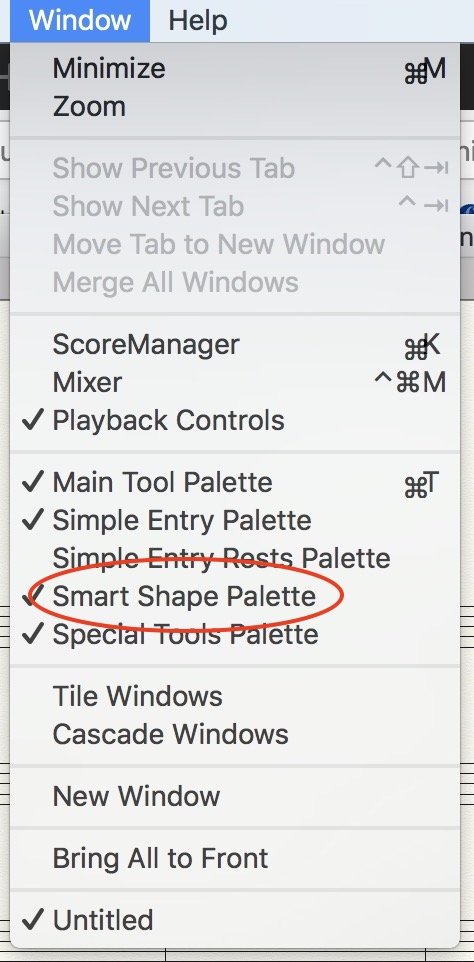
First, go to the Window menu, and make sure that the Smart Shape Palette is checked.


Find it on your screen. Yours may be a different shape, possibly a single up and down palette. Once you find the palette, you will see the tools.


Comment actions Permalink
Avatar
0

Yes I have it now. It doesn't thickens in the score, but it do in pdf-print. Thank you.


Comment actions Permalink

Please sign in to leave a comment.