Is it possible to add the Segno symbol to a line of "lyrics". Thank you in advance.
26.2.2.494
Windows 8.1


Thanks Peter but I'm not at a level of knowledge that I follow you. The font I'm using is Maestro. I have reviewed expressions that seem to be available and I don't see the Segno. So are you saying to change from Maestro to a font that has the Segno? And to do so how can I find a font that has Segno without going through all of the font types? I must be missing something.
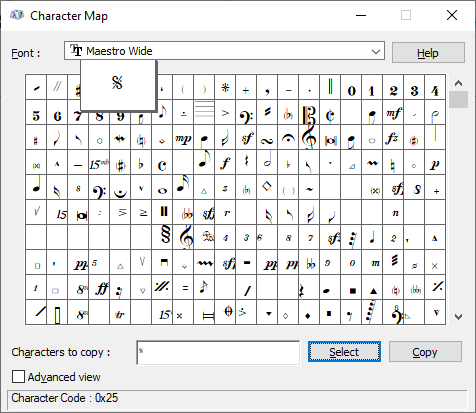
Actually the Maestro font does have the 𝄋 symbol, in character slot #37 (= where you in text fonts have the % symbol).
If I understand you correctly, you want to add the 𝄋 symbol in a text expression - right?
In the Expression Designer, set the font to Maestro, and type %.
You can adjust the font size, to adjust the size of the 𝄋 symbol.
A more general solution, to search a font for a specific symbol:
In many tools the Text menu is available.
You also have the Text menu available when you are in the Expression Designer.
Text menu > Inserts > Symbol…
Finale will show the Symbol Selection where you can browse the entire font.


Please sign in to leave a comment.
6 comments
Date Votes