New post
Avatar
0

What I am looking for is how to add the part name on page 2,3,etc.. of a printed part. The instrument part is on the first page but only the title shows on the next page. So in instead of the title, I am looking for, i.e. oboe - pg. 2 or title - oboe - pg. 2, etc..

Can someone help?

4 comments

Date Votes
Avatar
0

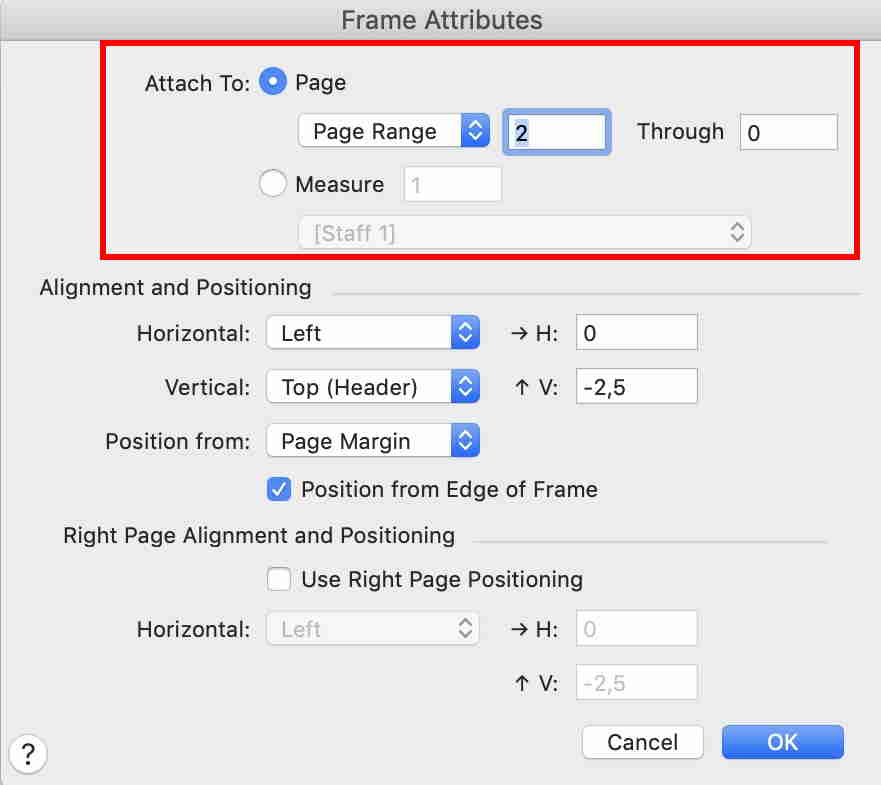
Edit Frame Attributes of the text block and define a page range : from 1 to ... (leave blank)

If you like the size, position, etc... of your text to be different than on page 1, define a new text (via Text menu -> Inserts -> Part/Score Name) and set the page range from 2 to ... (leave blank).

Comment actions Permalink
Avatar
0

Windows or Mac? - what version of the operating system?


Are you using the “full Finale” - or one of its smaller siblings? - what version of the program?


The following is for Finale v26:

Text Tool.

A handle appears on the text block.

Drag-select the text block handle, and go to

Text menu > Frame Attributes… (shortcut: Shift-Return)


In the top of the dialog box Frame Attributes, use the pop up menu to control, on what pages the text block should display.


Comment actions Permalink
Avatar
0

I am using Version 26.2

Comment actions Permalink
Avatar
0

Mac

Comment actions Permalink

Please sign in to leave a comment.