

Hi everyone,
I'm looking for a way to get all beams flat at the same level - whatever the note played is...
Attached is an example where I'd like all beams to be at the "red line" level!
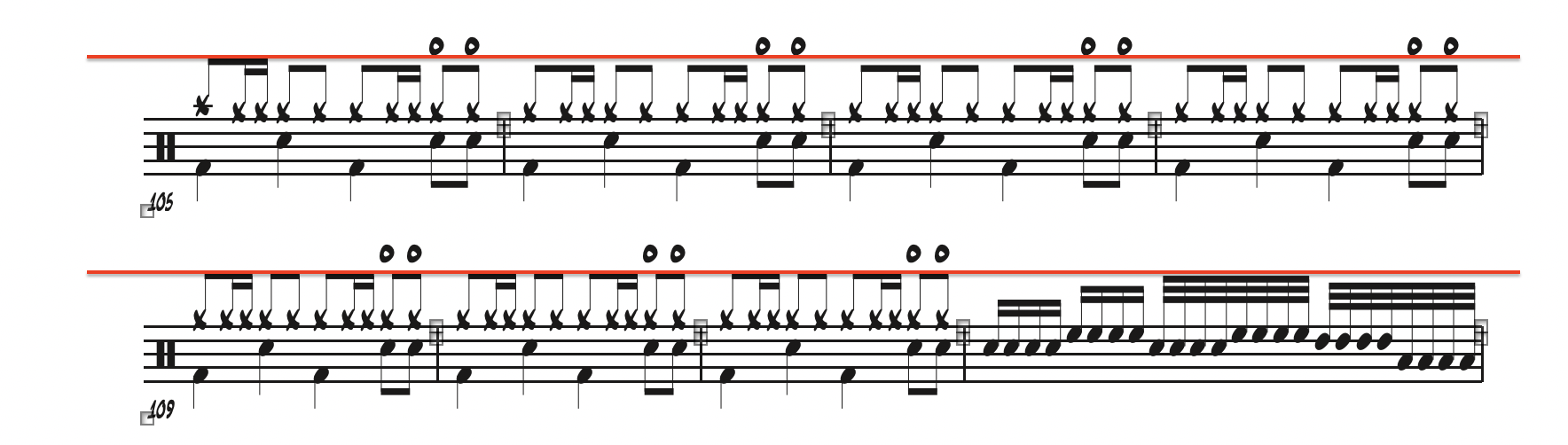
I know how to adjust one beam at a time using "Special Tools --> Beam Angle Tool", but it gets very time consuming... and I'd like to find a more elegant way to edit all beams at once.
I have also tried exploring Patterson's Beam tool and JW Change plugin without success, because it always increases/decreases all beams lenghts according to the NOTE position instead of a fixed reference point from the staff...
Can anybody help with this please?
(I hope my description of the problem is clear enough... 😅)
Thanks for you help!
Manu
Finale v26.3.1
iMac Pro / Mojave



4 comments
Date Votes