New post
Avatar
0

Finale 25.5.0.259 / Mac

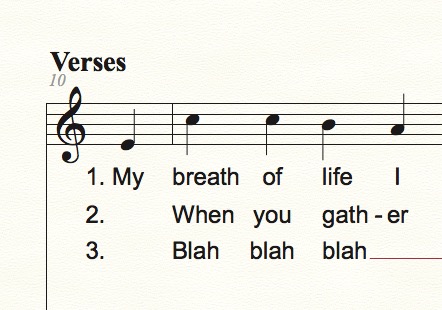
I need to enter several verses of a hymn. The first verse starts with a pickup note, but the others do not. I need to have verse numbers line up on the left but the first syllable of verse 2 to align with the first note of the next measure (not the pickup note). Is there a hidden character I can enter and assign to the pickup note for the verses after verse 1? Or is there a better way to do this?

12 comments

Date Votes
Avatar
0

You could enter the “hidden” syllable as a “no break space” character:

Option-Spacebar

Comment actions Permalink
Avatar
0

Thank you, Peter.

I've been trying that, but since it keeps the first syllable of the second verse attached, it won't allow the first syllable to go to the next measure (not pickup measure). I am using click assignment for the lyrics. I've tried both click assignment and type into score. I even tried more than one "no break" spaces and it just extends the pickup measure to accommodate them. I tried regular spaces; I tried both in combination (no break space + space + syllable). Am I entering it wrong? Any other ideas?

Comment actions Permalink
Avatar
0

Unfortunately I am unable to duplicate your problem.

Your sequence {no break space + space + syllable} works for me.


Let me get this straight:


If you in Verse 2 enter a visible syllable on the Pickup note, then the layout is as you need it (except that the syllable is visible), right?


If you replace the visible syllable with a “no break space” character, then something goes wrong in the layout, right?

Are you using the Lyrics window?

Comment actions Permalink
Avatar
0

Ann Marie, if you send me the score, I'll be happy to have a look. My email address in encoded in my signature.

Comment actions Permalink
Avatar
0

All fixed. The culprit was Auto Number Verse. Once I turned that off, I manually numbered the verses with the hard space, and all was well.


(Why is it, whenever something says “automatic”, it’s never that easy?)

Comment actions Permalink
Avatar
0

Dear Peter,

Thank you. The answer to all three of your questions is yes.

Ann Marie

Comment actions Permalink
Avatar
0

Thanks, Mike.

I am hoping the composer can live with the numbers not being aligned. When I opened the renamed file you sent, the numbering was not aligned left. So, what you did (at least what I can see on my version of Finale) turned out to be essentially the same as my leaving auto numbering on and simply clicking the first syllable under the second note (not the initial pickup note).

I did find another way of dealing with this issue in a hymnal that used a rest in the lyrics for the subsequent verses where the pickup note is, but I have no idea how to get a rest into the lyrics window. Do you know?

Comment actions Permalink
Avatar
0

So he wants the numbers and the first word of each verse, from 2 on, to be aligned?


You might just move that first number/syllable right or left.

Comment actions Permalink
Avatar
0

Yes, all the numbers aligned. Then the first word of each verse from 2 on to be aligned. How do I do that? Shift Lyrics didn't work for me.

Comment actions Permalink
Avatar
0

Perhaps it would be easier to add the Verse numbers with the Expression Tool?

Comment actions Permalink
Avatar
1

Got it now, I think. Apologies for not reading your initial post correctly.


Erase the numbers I told you to put in, and turn Auto Number Verses back on.


In Document Options > Lyrics > Automatic Lyric Numbers, click the radio button to Group Under the Same Note.


Comment actions Permalink
Avatar
0

Thanks, Mike! That's so much easier than all the things we tried!!!!

Comment actions Permalink

Please sign in to leave a comment.