New post
Avatar
0

I changed measure 1 to be a pickup measure but can find no way to force the final measure to be short (less beats) corresponding to the beats omitted in the pickup measure. Seems Finale should automatically do this, particularly when prompted to "apply music spacing". Instead, Finale is adding a rest to my final measure. Is there a way to get around this problem?

8 comments

Date Votes
Avatar
0

Finale doesn't automatically do that, because it's a practice that is falling out of use.


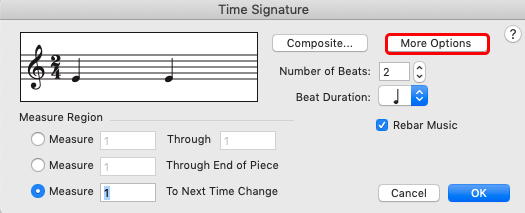
In any case, you can do it easily by Selection Tool > Right click on measure > Time signature > Edit time signature…

In the dialogue box, set your time signature to what you want it to be in that last measure. Tap More Options... and in the next box, click "use a Different Time Signature for Display" and leave that set as the original. It takes less time to do that, than to write about it!

Comment actions Permalink
Avatar
0

I tried that but I don't have "more options" in the time signature dialog. Is that option set somewhere else?

Comment actions Permalink
Avatar
0

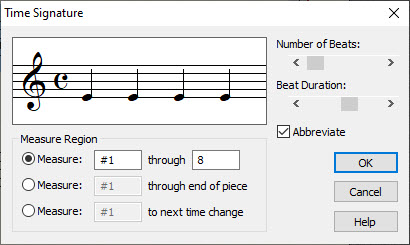
For your information :


Now, I don't know the context, but maybe you could simply create the "smaller" time signature and hide it with the Measure Tool in that measure.

Comment actions Permalink
Avatar
0

Looks like the problem is that I have Finale PrintMusic 2010.r1  --- it does not have the options to solve this problem. Strange, as I just downloaded it recently. Too bad Finale can't incorporate a standard user experience across their product line, would save a lot of time & confusion as this case has shown. I didn't buy a cheap version, I purchased the only one they offered.  Thanks the help, I'll just edit the printout by hand.

Comment actions Permalink
Avatar
0

PrintMusic should be mentioned in your Profile/Signature here, it would have helped to identify the problem.

PrintMusic has been upgraded to version 2014 I think.

P.S. : have you read my other suggestion (hoping it can be used in Printmusic) ? Measure Tool, double click on the measure, Time signature : "Always hide".

Comment actions Permalink
Avatar
0

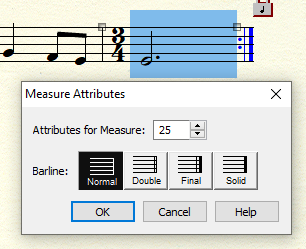
I did try Measure Tool -> double click on measure, but only get the simple dialog shown below. I checked and found I was in error as to the latest version availability. A 2014 version is available. Sorry I didn't see that.  I will upgrade asap. Thanks for your help.

Comment actions Permalink
Avatar
0

I see. There are very few options in that window, compared to the "full" Finale.

If you intend to do regular notation work, the "full" Finale would be recommended. There are discounts for upgrades from PrintMusic, I think.


Comment actions Permalink
Avatar
0

PM 21014 can't do it, either. You will need the full Finale.


You said: "Too bad Finale can't incorporate a standard user experience across their product line, would save a lot of time & confusion as this case has shown."

Had you read the General Discussion House Rules post directly above yours, you would have seen this: Include your operating system version and software version numbers. We could have told you immediately that PM won't do it. 


Comment actions Permalink

Please sign in to leave a comment.