New post
Avatar
0

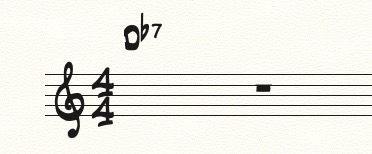
I'm having a problem getting the base chord name using the Jazz font.  I get other symbols instead.  See the included screen shot:


What am I doing wrong?  It stopped me dead imn my tracks before a run through on Saturday!


Thanks,


Brian Folkes

6 comments

Date Votes
Avatar
0

Brian Folkes,


Take a look in Document Options - Fonts

In the pop up menu Chord you can set the font of 4 different chord elements:

Symbol (= the scale step for the root)

Suffix (= the chord type, e. g. m7)

Alteration (= accidental)

Fretboard


For the root (= Symbol) you need to use a text font, not a music font.

Do not use the Jazz font for Symbol - the Jazz font is a music font.

Instead, use the JazzText font.

Comment actions Permalink
Avatar
0

Thanks, Pete, that totally worked!


Comment actions Permalink
Avatar
0

Newly weird chord issue.  When I type Db I get DB.  At least the "B" is a superset but it's capitalized.  And, no, the cap lock isn't on.  I've tried typing upper and lower case to see if it was backwards.  When I type a D7/F# it looks fine.  Is there another keystroke for flats?

Comment actions Permalink
Avatar
0

What is your alteration font?


This example uses Symbol: Jazz text, Suffix: Jazz Cord, Alteration: Jazz


(Note: when you enter the b for the flat, it will show as B until you go to the next chord. Then it will turn to the flat.)


Comment actions Permalink
Avatar
0

The alteration font iwas set to Jazz Cord.  I changed it to Jazz and all is well!


Thanks for your help!!

Comment actions Permalink
Avatar
0

For the Alteration you should always choose a music font - so that hitting the letter B key will produce a flat symbol, and typing # will produce a sharp symbol.

Comment actions Permalink

Please sign in to leave a comment.