New post
Avatar
0

I'm using Finale 2014 on Windows 7.

Singing in a men choir, I'm rewriting some old scores which are not very readable.

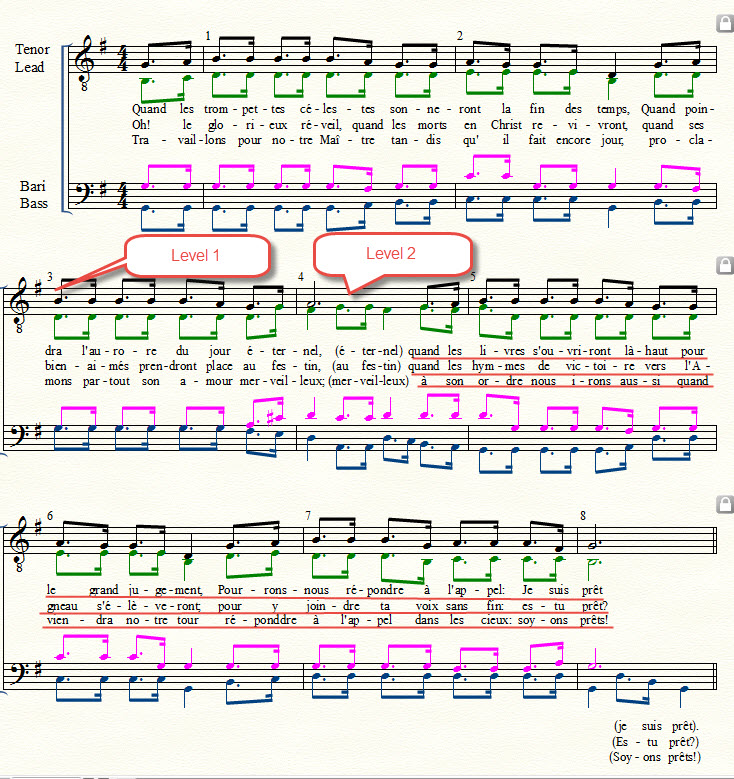
I'm surprised to have sometimes underlines  (with the color of advanced lines) under the lyrics, without having differences in the lyrics in the lyrics windows when underlines or not. Looking at the color, I saw that the lines are advances lines.

To remove them, I must click on them, right mouse button and delete. But why are they coming?


14 comments

Date Votes
Avatar
0

I suspect that it's because the lyrics don't match the notes they are attached to. If you can post a screen shot, we can probably tell you exactly where and why it's happening.

Comment actions Permalink
Avatar
0

My first guess would be that you have entered the lyrics via Type Into Score.


The words in the Lyrics window appear in the order you typed them - regardless of the order in the score.

You may e. g. begin by entering the last line in the score, then the first line in the score, &c.

Then the Lyrics window will display the last line (because you began with typing the last line), and after that line the Lyrics window displays the first line, &c.


The so called Word Extensions may show up if the words in the Lyrics window appear in another order than in the score.

Finale uses the order in the Lyrics window to decide whether a word should have a Word Extension.

A word does not get a Word Extension if the following word (in the Lyrics window) is attached to the next note in the score.

If - On The Other Hand - the following word is attached to another note than the next note …


To avoid the problem you can

1) Type the syllables into the Lyrics window (in the correct score order), and next attach the syllables via Click Assignment.


2) You could also try using Type Into Score, and enter all the syllables in the score order, but you have to be very careful that you do not make any mistakes.

Comment actions Permalink
Avatar
0

Thank a lot for the comments.
I cannot now publish a screen shot of the problem, because I have suppressed the lines, but I have drawn them on a print copy that I scanned.I have done as you described
Very probably the reason is what Peter says. As it is a song for 4 men voices, sometimes Tenor 1 don't sing, when Tenor 2 sings. I typed the words in the Lyric windows and change the level 1 to 2 for the words of the tenor 2. It is after this that I had the lines.
How should I do the next time when I need to change the level 1 to 4 for the voices to avoid the underlines? because the suggestions are not applicable in this case?


Comment actions Permalink
Avatar
0

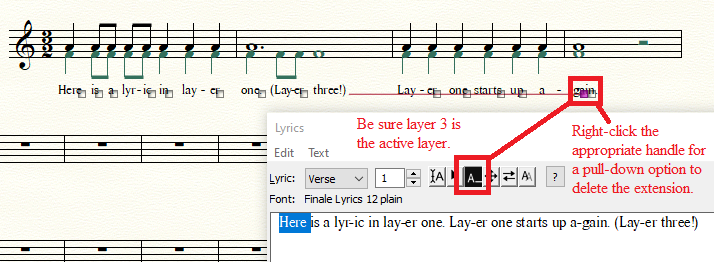
The lines that trouble you are extensions from lyrics added into layer 3(?) that extend beneath succeeding lyrics attached to layer 1. You should be able to click a handle on each of thelayer-3 extensions and instruct the extension not to show.


Comment actions Permalink
Avatar
0

Thanks,

The way is the same as pointing the arrow on the underline, right click and suppress, same pull down option as with the A_ in the Lyrics windows.

Comment actions Permalink
Avatar
0

Based on the example you’ve shown, I would attach all of the lyrics to the layer two (tenor 2) notes. That would eliminate the extensions.

And by the way, there is no reason to use layers 3 and 4 in the bass clef. You can still use layers one and two. 

Here is a link to a tutorial I wrote for lyrics in barbershop music, which has a lot of the same problems: https://www.dropbox.com/s/t86t7xfkej82p6a/Lyric%20entry.mov?dl=0

Comment actions Permalink
Avatar
0

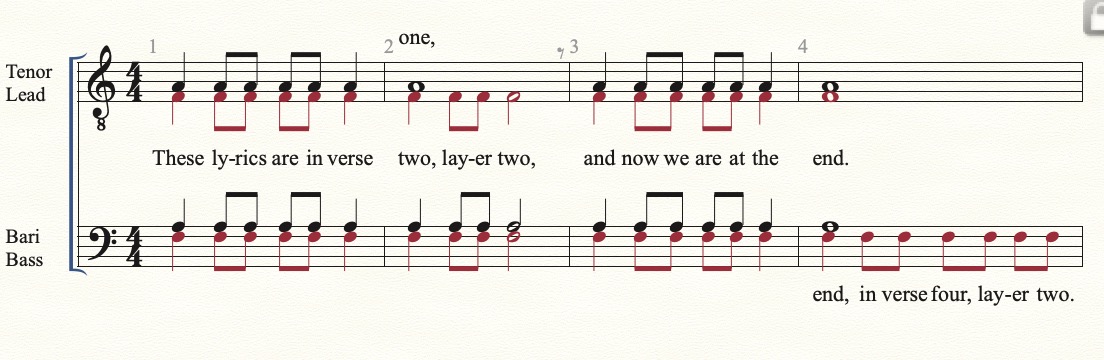
This may be a little clearer:

Tenor 1 is in Layer one, and uses lyrics in verse 1.

Lead (Tenor 2) is layer two, verse 2.

Bari is layer one, verse 3.

Bass is layer two, verse 4.

Yours will be a little different, because of the multiple verses. In this case I might give the leads verses 2, 3, and 4, and shift the bari and base to verses 5 and 6. It's just a matter of adjusting the baselines. To stop the runaway word extension in the Tenor 1 line, use a hidden grace eighth rest.


Comment actions Permalink
Avatar
0

Yes it's clear. Thank you.

Could I ask you a second question, which is not far away of my first question.

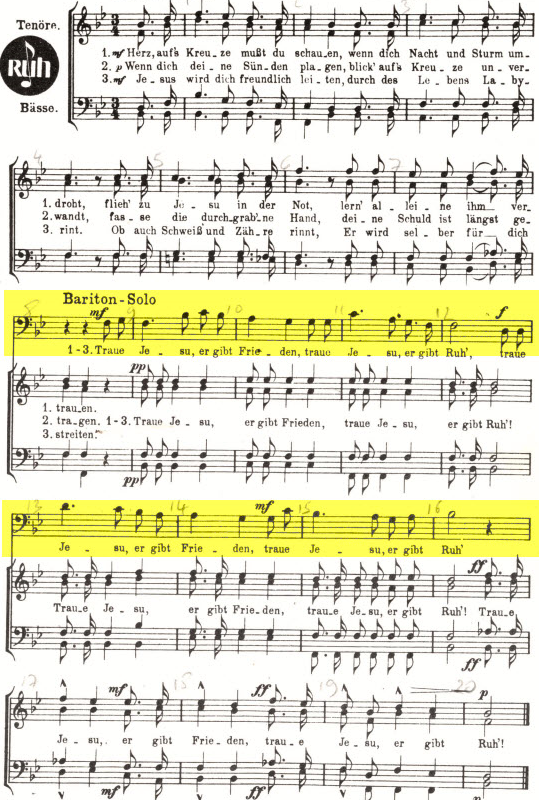
When I have a score with the 4 voices, 2 tenors, a bass and a baryton, and for a few time there is a solo (it could be an instrument), and I will not have in the all score a 5. staff as this example, how create this local 5. staff?
I didn't find in the Finale User manuel and not in the plug-ins JW tools or TGTools.


Thanks a lot

Robert


Comment actions Permalink
Avatar
0

Robert Nissels,


The way to do so in Finale:

Add the extra staff to all the measures of the entire document.

Then, hide the extra staff from Page View where you do not need it (use the Staff Tool).

The staff is hidden from Page View only.

It will still be visible everywhere in Scroll View.

Comment actions Permalink
Avatar
0

Hello,


I have a french version. Is the Staff Tool a Plug-in JW Staff Polyphony or which one is-it? Could you put a print shot of the menu where I find it? Thank you

Comment actions Permalink
Avatar
0

Comment actions Permalink
Avatar
0

OK, thank you.

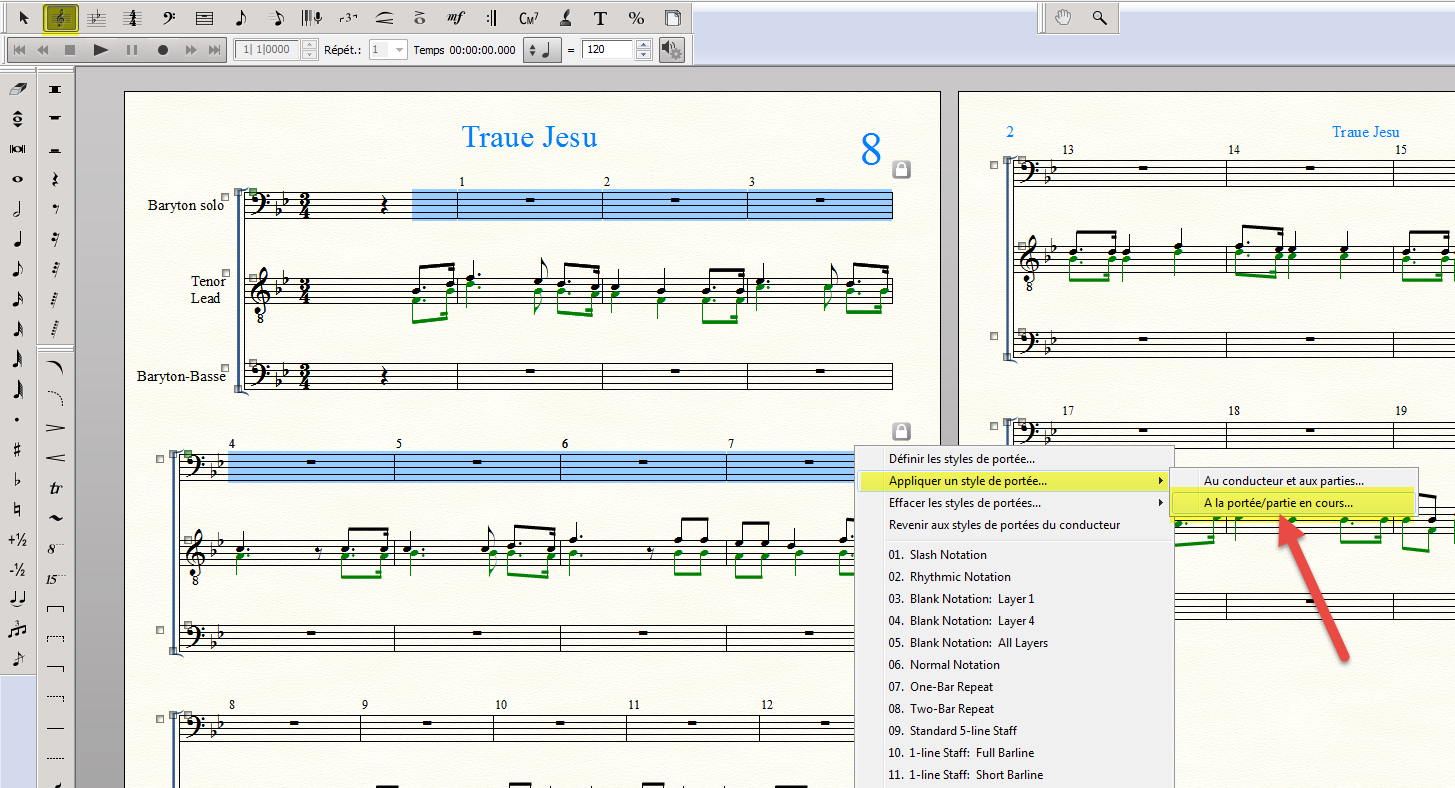
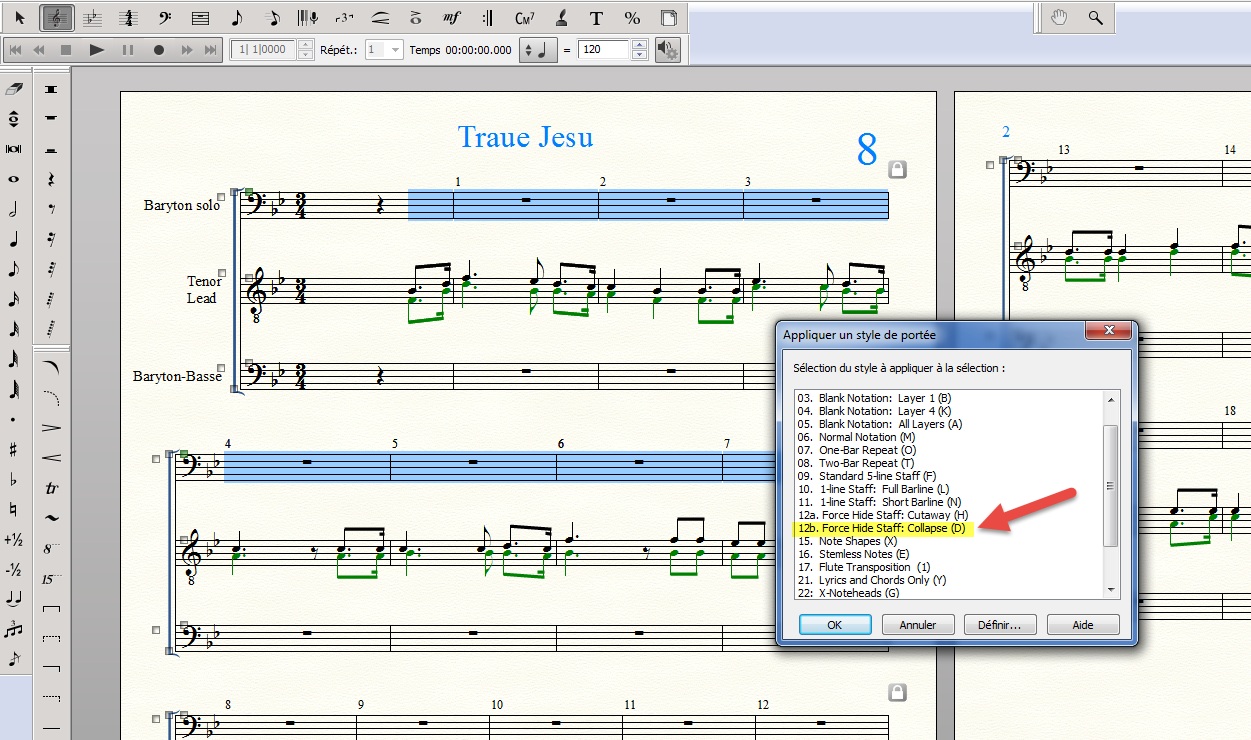
I select the staffs to hide with right click on them, then "appliquer un style de portée" "à la portée en cours" 

and select Force Hide Staff: colaps

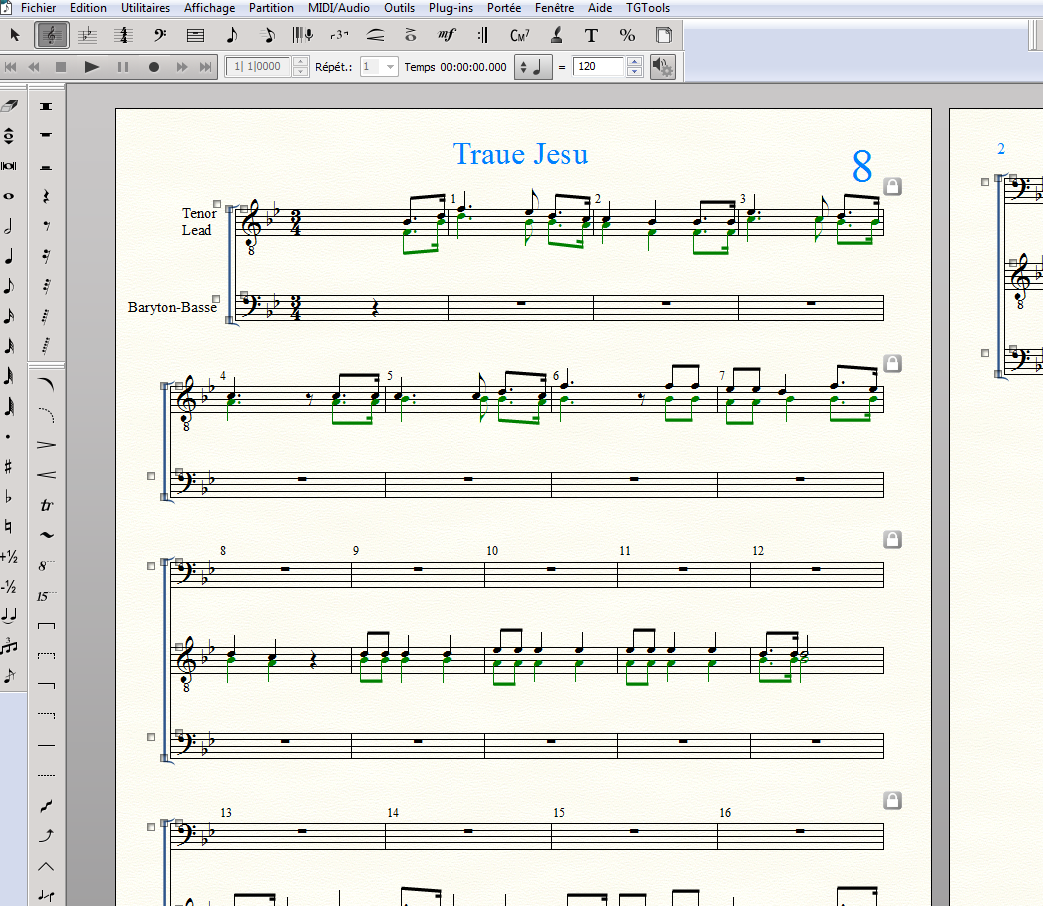
The result is perfect:

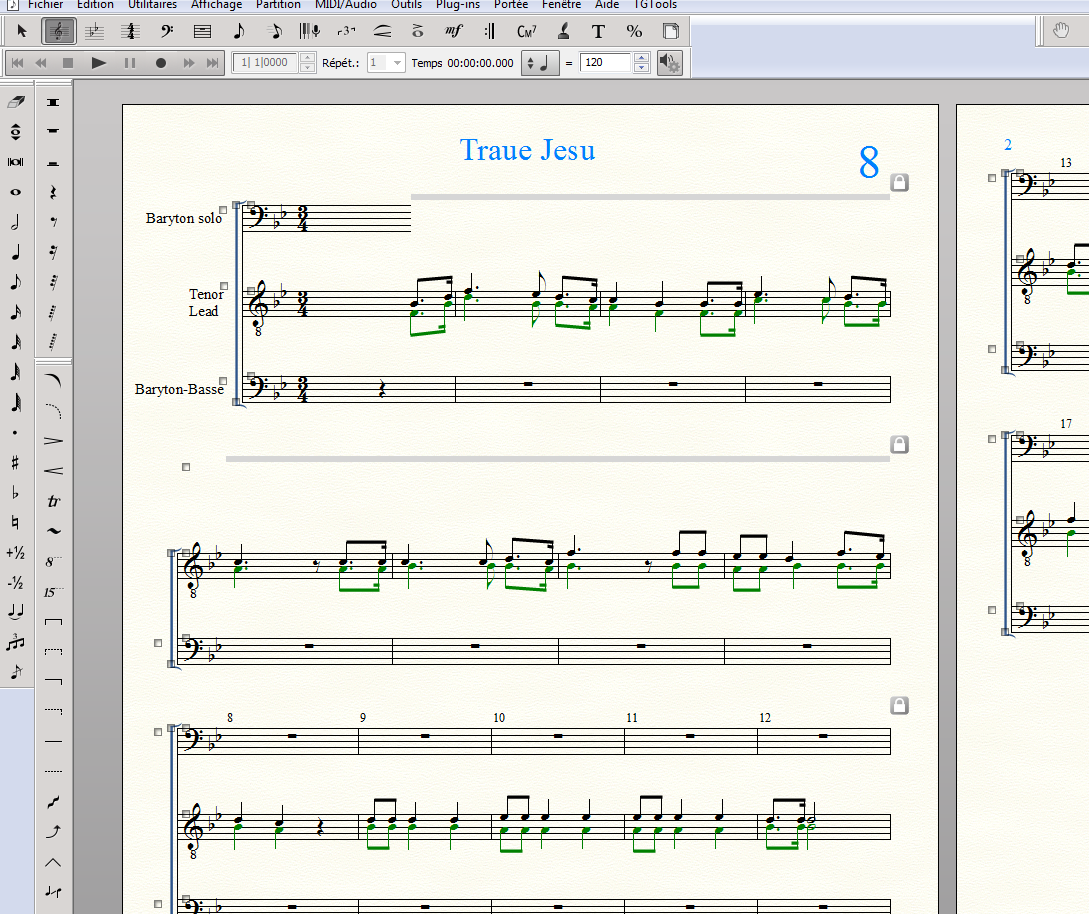
With Force Hide Staff: Cutaway: some measures are hidden, but not the first.


Comment actions Permalink
Avatar
0

Rather than a staff style, select the staff with the selection tool, and right-click in the handle. Choose Hide Empty Staves.

Comment actions Permalink
Avatar
0

Congratulation. It is easier. I tried it!

Comment actions Permalink

Please sign in to leave a comment.