New post
Avatar
0

I want to put a rallentando into my score, but almost all of the Tempo Alterations options are now missing in this latest version of Finale. Why are these gone? And how do I replace them?

17 comments

Date Votes
Avatar
0

The so called Tempo Alterations are expressions.


Expressions are document specific (not program specific).


You can create the Tempo Alterations yourself, or you can load a library with expressions.

Comment actions Permalink
Avatar
0

Rallentando is located in #70 in my Finale 27 in Expression selection under Tempo Alterations.

Comment actions Permalink
Avatar
0

I found what the problem is - it's in the finale files coming over to this new version. New files are perfectly fine. Must just be a bug.

Comment actions Permalink
Avatar
0

Send it in to Tech Support. They need to know how many problems come up with legacy docs in F27. It should be seamless, but it ain’t.

Comment actions Permalink
Avatar
0

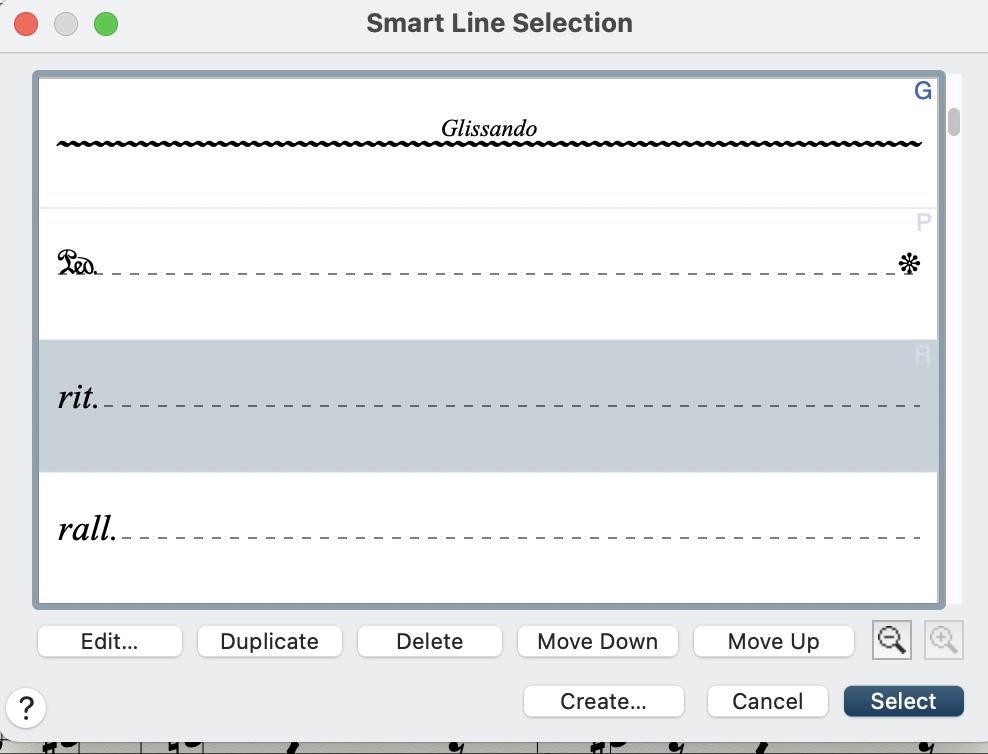
It is true that Rallentando is an Expression, but it is also a Smart Shape:

the first applies to all staves the second NO (pity, it is much better designed...)

Comment actions Permalink
Avatar
0

Its not a Smart Shape in my Finale 27 nor yours unless you put it there.

Comment actions Permalink
Avatar
0

also in Metatools


Comment actions Permalink
Avatar
0

That SmartShape is not a trill: it is a glissando (as a harp might play) and is clearly labeled as such.

Comment actions Permalink
Avatar
0

… That SmartShape is not a trill: it is a glissando (as a harp might play) and is clearly labeled as such …


Am I missing something?

Alessandro Melchiorre is talking about Rallentando.

Who mentioned a trill?

In the screen shot Alessandro Melchiorre has highlighted the third line from the top - which has a rit.

And the fourth line has a rall.

Comment actions Permalink
Avatar
0

and both are triggered by metatools  as in the manual...

Comment actions Permalink
Avatar
0

My mistake.

Comment actions Permalink
Avatar
0

no problem...

anyway would be very good if those Smart Shape could apply to all staves as they are much better designed...

Comment actions Permalink
Avatar
0

… would be very good if those Smart Shape could apply to all staves as they are much better designed …


You can use the Copy Filter to copy them to all the other staves.

Comment actions Permalink
Avatar
0

...  nor yours unless you put it there.

Comment actions Permalink
Avatar
0

those smart shapes are by default.

Comment actions Permalink
Avatar
0

those smart shapes are by default.

I must be more clear, I guess. That shape is one you have to load or select yourself. It is not there in the default Smart Shape tab. You acted like you were confused as to whether it was an Expression or a Smart Shape. I think the others thought that also.  I was merely trying to tell you what you had to do to get it there whether in Expressions or Smart Shape.

Comment actions Permalink
Avatar
0
thanks
Comment actions Permalink

Please sign in to leave a comment.