When I playback the drum set part, the foot high hat is covered by the ride cymbal and cannot be heard. Is there a way to balance the playback without putting the high hat part on a separate staff?
I'm using Version 26 with MacOS Catalina V10


I often encounter the same problem, when "Drum Set" is selected. All the sounds of the Drum set are concentrated on one midi channel (10), so one cannot change the balance between the various components of the Drum set. Impossible to split the sounds to different layers. They share the same midi channel (for percussion).
Your idea of another staff (hidden ?) with just the element you want to put in balance seems to be the only solution I can think of. That staff could use another percussion midi channel (26,...). But I could not get it to work.
I'm curious to see if someone comes up with a solution.

One can load multiple instances of Garitan Aria (or SoftSynth) and assign different layers to different instances. So as long as one used the louder instance only for the drum sounds one wanted to sound louder, the biggest problem one would likely have would be stemming.
Admittedly, it's a lot easier in VST.
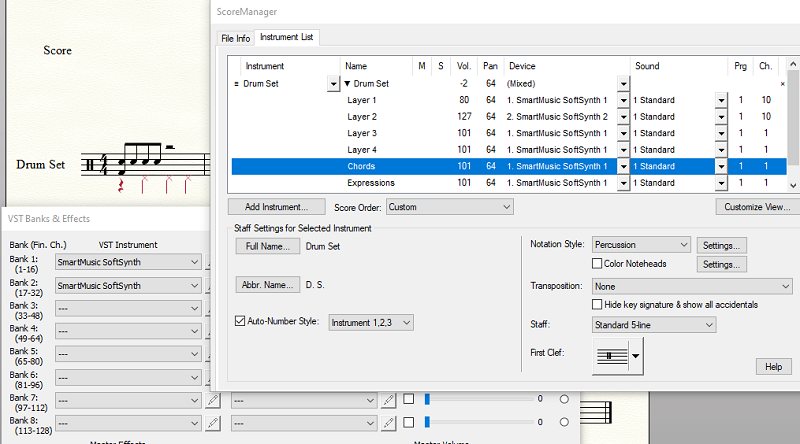
(Notice that the Softsynth for layer two is a different Softsynth: Softsynth 2.)
Of course, if you are using an external synth, unless there are some acrobatics you can perform there to isolate voices, you would need a duplicate synth for the Pedal H.H. (or any other sound you wanted to isolate) to send different velocity/volume to just those notes triggered by the second layer.
This is not something I do in my own writing, even with VST playback. It's far easier to use hidden accents, dynamics, or tracks to bring out specific notes.
The idea to use different dynamics (hidden) for specific layers is worth exploring, as long as a specific instrument (hi-hat) is placed in a specific layer, all by himself.
The Expression Assignment window allows indeed an expression to be applied to the playback of a specific layer.
Please sign in to leave a comment.
7 comments
Date Votes