New post
Avatar
0

Actually, I am a Korean, and it is a Korean letter problem.

But I believe I can get a solution here!

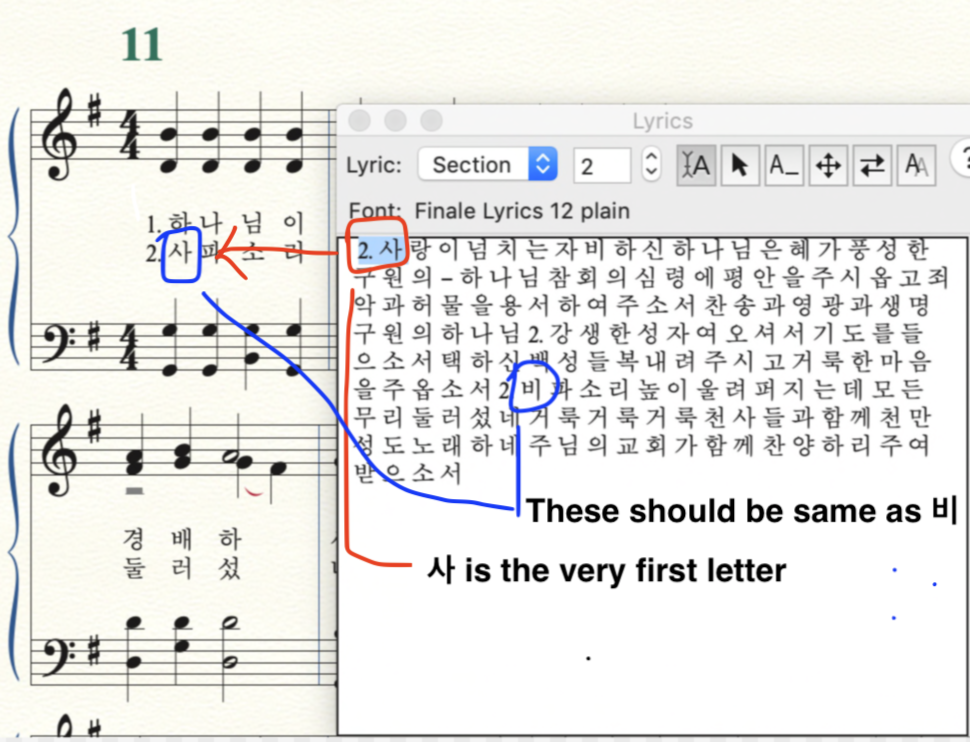
When I input letters, the very first letter is in the middle of somewhere, even though I put it right. 
The wierd thing is, everything is alright in the Lyrics Window, but it is wrong(different from the Lyrics Window) with a note in the music sheet.


For example, when 'a' the letter of 'apple' is a very first lyric, aetter(instead of letter) is in somewhere. And the 'a', the very first letter, is still there rightly at the first place.

Even though I re-input several times, it's useless.

How can I do? I want to cry..

Thank you.

9 comments

Date Votes
Avatar
0

Mac or Windows? What Finale version? How are you entering the lyrics? Can you post a screenshot of the problem?


Are you using a Korean font?


We need more information.

Comment actions Permalink
Avatar
0

First of all, thank you so much for your reply!

I'm using MacBook Pro with Mojave(v.10.14.16) and Finale V25.

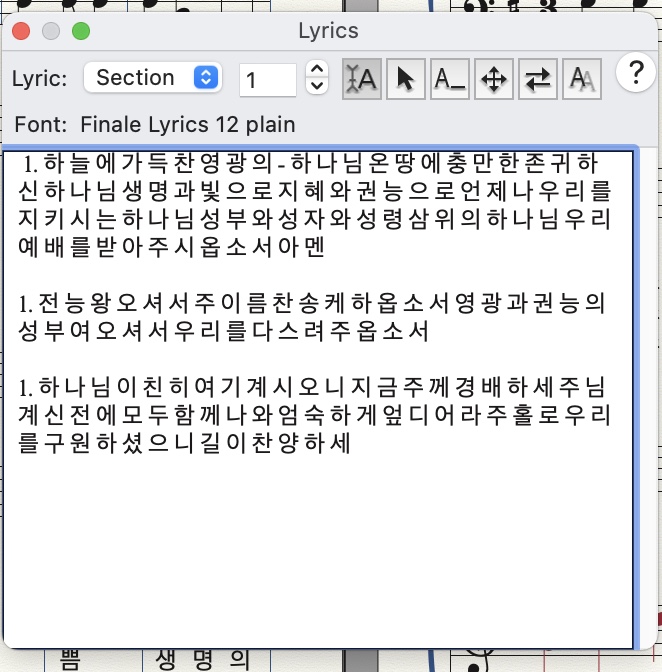
I input lyrics with this way. 


And, actually, 'Finale Lyrics' is already checked in the font list, and I just change the language with the keyboard.  

Comment actions Permalink
Avatar
0

It looks to me like you have the second verse number and lyric at the start of what should be verse one, in the sections category.  What happens if, in the lyric window (not in the score) you input the proper character? Also, could you use verses one and two in the sections category?

It looks like you have multiple verses in the later part of the score. Are they in their own verse or section or chorus numbers, or all lumped together?


Could you send me the finale document? My email is in my signature.

Comment actions Permalink
Avatar
0

Wow! really thank you for your help!!

but, I can't find your email address or anything related sending an email... How can I find it?

Comment actions Permalink
Avatar
0

At the end of Mike Rosen’s forum signature you can see this: wawoodman at aol dot com


To avoid spam bots Mike’s email address is a little “encrypted”:

Replace ‘at’ with ‘@’

and

replace ‘dot’ with ‘.’

Comment actions Permalink
Avatar
0

ahahahahah!!!! I got it!! Thank you so much Mr. Peter Thomsen!!!! :-)

Comment actions Permalink
Avatar
0

Thanks, Peter. I didn't think it needed explanation, but I'm wrong, again!

Comment actions Permalink
Avatar
0

Mike!! You know what?!?!?! I did what you said,

This on, making space!! It works!! Actually, I deleted all lyric, and input newly with making space several Hymns. Everything is going perfect so far!!! If I have problem with this, I will ask you by email and Zoom, actually, zoom thing is so thankful. How kind of you! God bless you!!!

Comment actions Permalink
Avatar
0

You’re very welcome. Glad I could help!

Comment actions Permalink

Please sign in to leave a comment.