New post
Avatar
0

Using Finale v27, with MBP running Catalina.

I have a few standard requirements when I create a new finale file, but I don't want to use templates, because that's too specific to a bunch of parameters (like score layout and so on).  

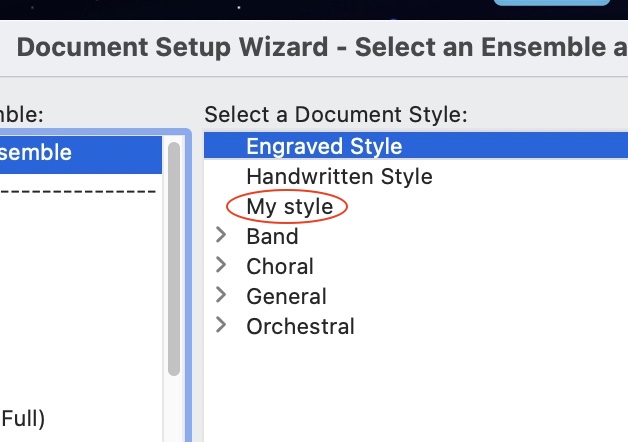
So, following the manual, I have created and saved a .musx file in the Document styles folder (i.e Application Support ... -> music files –> Document styles. (It is sitting along side the Finale Maestro and Finale Broadway files that are already there and which duly appear, therefore, as options in the "Select a Document Style" menu in the set up wizard.)

However, when I then go into the set up wizard, my document style is not there.  I'm following the instructions in the help – any idea why this is not happening as it should (I did this OK with Finale 25 previously).  FWIW I have restarted Finale, rebooted the machine, etc.

Thanks,

Simon 

6 comments

Date Votes
Avatar
0

On Windows machines there are two sets of such files, one in the Program Data section and one in the individual user's %appdata% folder. I suspect Macs use a similar system, a default section plus a "copy" made to each individual user's section of the OS so that customizations can be different for different users of the software on a given machine. I suspect that you added your custom style to the general section used for the original installation of the software rather than to your personal version of the defaults.

Comment actions Permalink
Avatar
0

SImon I am on a Windows machine and I too think the way Finale handles these things is goofy but I can get it to work.


I think the easiest way is to just make a 'default' musx file and leave it in you general music folder. Where you save any Finale file.


Just make a basic file that has all the settings you want and open it each time.  Do a quick save-as and notate away. You can add or delete instruments as you like. Add measures, whatever.

Comment actions Permalink
Avatar
0

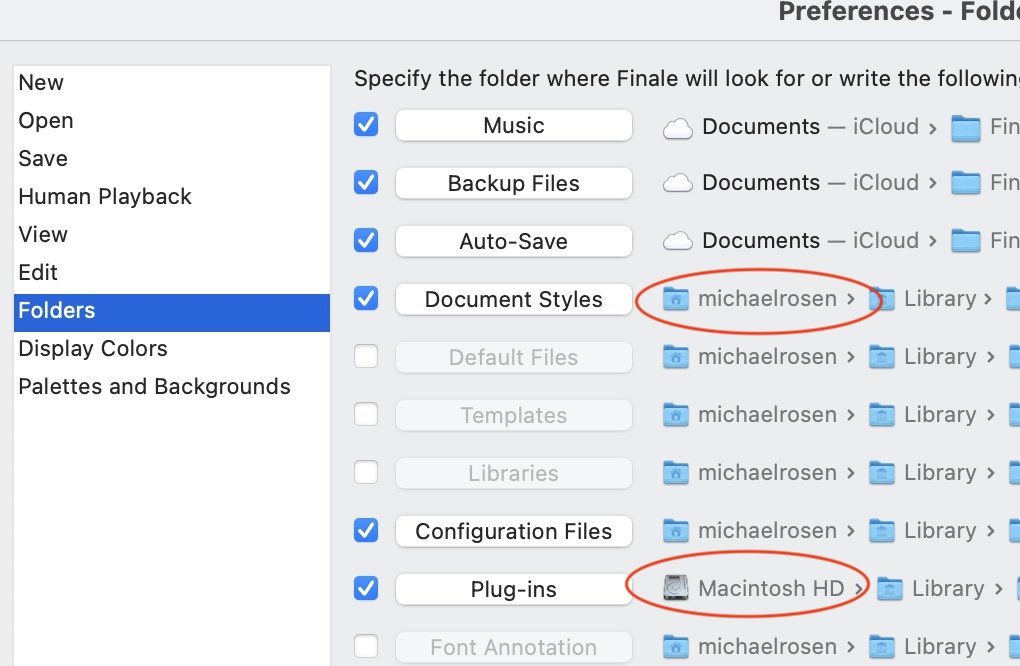
Make sure you follow the path shown in Preferences > Folders. As Adrian said, allowing for platform differences, it has to go in your user library, not in the general one!


Comment actions Permalink
Avatar
0

Note the different roots here: Plug-ins are in the hard drive library, while document styles (and all the others) are in my user files.


Comment actions Permalink
Avatar
0

i'm not on Big Sur but in Catalina, I had to navigate manually after the first time I placed a style sheet in. Subsequently, it showed up as it should.

Comment actions Permalink
Avatar
0

Thanks for all the responses.  I think I've found a way forward, so much appreciated -- can get back to writing music rather than banging my head against a wall.

Cheers all,

Simon

Comment actions Permalink

Please sign in to leave a comment.