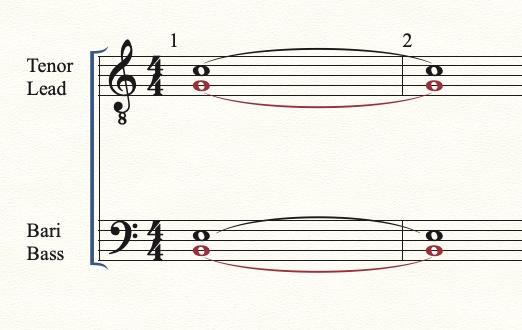
Windows 10. I arrange both satb and ttbb scores. When I tie notes in both the lead and bass entries, the tie is not in the correct position( bass , the tie is upward and in lead, again it is upward) .


Hello, Mike. Yes, there are four fields to enter notes....tenor, lead, bar, bass. The tenor notation and bass seems to work properly. The lead and bass incorrectly show the "tie" facing the wrong direction.
Also, the flag direction is inconsistent in all four voicings, sometimes up, sometimes down. I have to manually change these flag directions. Not sure what th neck is going on as I never had these issues before after over 25 arrangements
I have re-downloaded the print music software but these issues persist.

… there are four fields to enter notes....tenor, lead, bar, bass …
Gary Thiel,
From your description it sounds like you have two staves, with tenor and lead in the upper staff, and bari and bass in the lower staff - right?
And it sounds like you have entered tenor in Layer 1 (displayed in Black), lead in Layer 2 (displayed in red), bari in Layer 3 (displayed in green), and bass in Layer 4 (displayed in blue) - right?
In this case there is no need for Layer 3 and Layer 4.
Try this:
In the lower staff, enter bari in Layer 1, bass in Layer 2.
In measures where there are entries in both Layer 1 and Layer 2, the Layer 1 stems and ties should automatically freeze up, and the Layer 2 stems and ties should automatically freeze down.
At least that is the default document setting.
Yes and yes. There is a specific template for this....two staves, one for means and tenor and the lower stave for bari and bass. This is the specific template suggested by printmusic, the
template of which I have used for arranging for over 10_years with absolutely no issues until now.
Please sign in to leave a comment.
6 comments
Date Votes