New post
Avatar
0

Hello All,

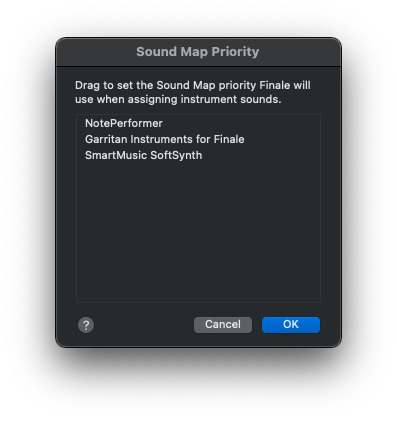
I use Note Performer 3 on Sibelius every day.  It shows up as an option under the "audio setup" page.  But on Finale 27, I can't seem to find it. It's not in the "Sound Map Priority" window, and I can't seem to find Note Performer anywhere within Finale.

I'm on Mac OS Monterey, M1 Pro 2021 MacBook Pro.  Running Finale 27.1.0.277.

Any help is greatly appreciated.  Thanks.

18 comments

Date Votes
Avatar
1


Greetings Steve. Happy to try to sort this out.

I use NP 3 and had some speed bumps along the way with Finale (I've never used Sibelius so can't comment there, but things seem very similar to operate NP under Finale). My suspicion from their site is that they are much better set up for Sibelius than Finale (and so far, perhaps less so on Dorico although that might change). Even so, it works very well in Finale.

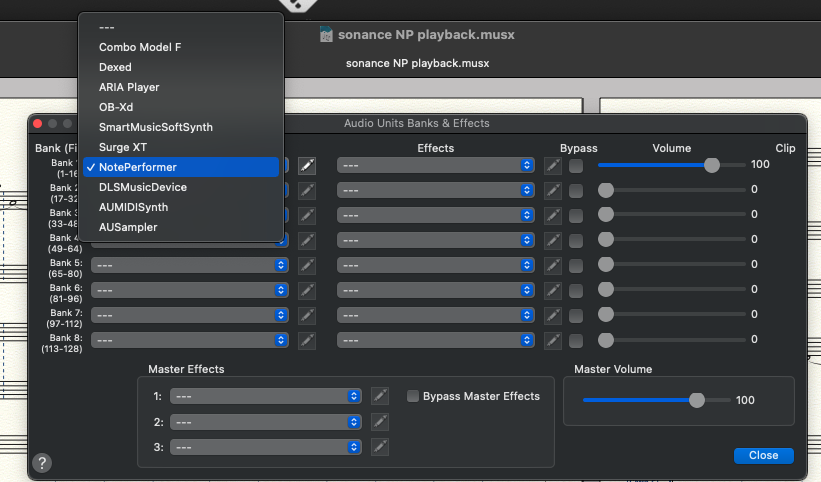
Here's how it appears on my end in F27.1:

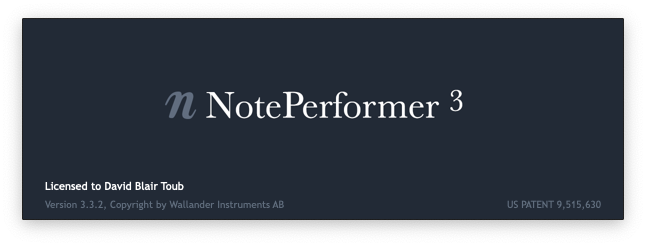
So the fact that you're not seeing NP in the Sound Map Priority nor (I'm assuming) in Audio Units Banks & Effects suggests to me that it hasn't actually been successfully installed. For example, if you click on Speedy Entry in Finale while in a score, does NP load such that you see the following as it loads its audio files into the score:

Once it's installed and loads, there are other things that need to be tweaked (the sound map priority, making sure patches load before play in Playback Controls, etc, but those are all well detailed on their web site), but it sounds like you're not even getting that far. I'm on Monterey as well (12.2 in my case) and an Intel MBP from late 2018, so more or less the same as you other than the CPU. Let me know what your equivalent screen shots look like on your system. 

Comment actions Permalink
Avatar
1

Since you have it installed, you should be able to get it working. 


Do go to the manual and read the Finale part. As David points out, it is different from Sibelius or Dorico so read the whole thing. Start at page 28:

https://www.noteperformer.com/media/NotePerformer%20-%20Users%20Guide.pdf 


I'm also over Monterey 12.1 (2017 iMac Pro) and am finding some minor issues but nothing I can't work around. 


Comment actions Permalink
Avatar
1

When one installs NP, it asks during the installation which program(s) you want to use it with; so I would imagine there are different links or drivers installed for the notation program(s) you specify. So I also recommend reinstalling NP.

Comment actions Permalink
Avatar
0

Hi David and Mike, thank you for the replies.  Here's the weird thing:  NP3 is showing up in Audio Units Banks & Effects, but it's still NOT in the Sound Map Priority list.

I don't know how to uninstall NP3, since it's not showing up in any spotlight search, any other search, or in my App folder, ... it's nowhere to be found, but it's on the Audio Banks & Effects, and pops up every single time I launch Sibelius.

I'm at a loss.  Thanks again for your help, gentlemen.

Comment actions Permalink
Avatar
0

J Adrian, thanks for the reply.  I can't figure out how to uninstall NP3, since it's nowhere to be found via spotlight, or any other search, and it's not in my App folder to delete.  


Comment actions Permalink
Avatar
1

No worries. From their site: run this

/Library/Application Support/NotePerformer/
Uninstall NotePerformer.command

Comment actions Permalink
Avatar
0

Aah yes!  I'm sorry, I overlooked that part.  I'll try that.  Thanks a bunch!!

Comment actions Permalink
Avatar
1

No problem. I made a lot of mistakes early on because their web site, while it has a lot of great information, makes it a bit daunting to find. 

Comment actions Permalink
Avatar
0

David, this came up when I tried to enter that command in Terminal:

zsh: no such file or directory: /Library/Application

Comment actions Permalink
Avatar
0

When one installs NP, it asks during the installation which program(s) you want to use it with;


Really? I've never seen this. As part of troubleshooting my system, I did a clean install of Monterey 12.1, Finale 27.1 and NotePerformer 3.32 only. Afterward, I installed Finale 26.3.


Perhaps an earlier version made this request?

Comment actions Permalink
Avatar
0

David, this came up when I tried to enter that command in Terminal:

zsh: no such file or directory: /Library/Application


Hmmm. I think that’s something to report to their tech support. They are pretty responsive and likely can help you out with the main issue of NP not being available in the sound map priority. 

Comment actions Permalink
Avatar
0

Mike, I had the same thought.  During installation of NP3, I never received a prompt to choose which apps to use NP3.   David, I send a tech support case into Finale yesterday, and still have yet to hear back.

Thanks so much for your prompt and informative responses, gentlemen.

Question - will I need Rosetta 2 to run NP3 in Finale v 27 on my 2021 MBP M1?  The prompt to use Rosetta never showed up, so I doubt it, but is this a possible oversight by the programmers at NP or just a thing that might eventually be addressed in a future update?


Comment actions Permalink
Avatar
0

That may be best asked of Wallander. They're good at getting back quickly. I've seen nothing online one way or the other.

Comment actions Permalink
Avatar
0

Yeah I don’t recall such a prompt either. 

as far as Rosetta, I’m still on intel so I can’t say for sure but would suspect it would. NP 4 is anticipated but hasn’t been announced and as with Finale, one would think it would be recompiled to M1 and M2 CPUs but let’s wait and see, I guess.  

Comment actions Permalink
Avatar
0

Mike, Thanks - I just submitted to Wallander a couple hours ago.  Still have to hear back from Finale and Wallander now.

Comment actions Permalink
Avatar
0

I've remembered that I had an install problem with NotePerformer and Monterey. I could access it because it was correctly installed in 26 but it behaved differently which was weird. Here's what I received from MM Support:


The Sound info in the ScoreManager is populated by the NotePerformer.soundmap file located at /Library/Application Support/MakeMusic/Finale 27/Data. Either this file is missing or it is broken. 


Go to this location and see if the file is there, if it is delete this version (or you can just move it to your Desktop for the time being). Then copy the file in the v26 version of the Data folder at the similar path to this folder (/Library/Application Support/MakeMusic/Finale 26/Data) and relaunch Finale. 


In my case, the file was missing from 27. I copied it from the 26 path, rebooted and it behaved. I don't know if that will help in your case.


I still have another issue where, if I reinstall NP, both 26 and 27 crash. I have to use APFS Snapshots to restore my computer to an earlier state for them to work again. As NP is working since that manual install, I'll wait till NP 4 is released before rolling up my sleeves on it. I'm quite used to sending crash logs to Apple when that's the next step.

Comment actions Permalink
Avatar
0

Tengo un problema con mi programa, instale NOTEPERFORMER 3.2 y al reproducir me sale varias ventanas que dice que no se encontró el plugins de los instrumentos y no emite sonido. Ayuda por favor

Comment actions Permalink
Avatar
0
I have a problem with my program, I installed NOTEPERFORMER 3.2 and when playing I get several windows saying that the instrument plugins were not found and it does not emit sound. Help please

You have to follow the instructions exactly. It is not intuitive.

https://www.noteperformer.com/ 


Arne's tech support is good but you should upgrade to 5.1 first. If you own a copy of NP 3.2, the upgrade is free.

Comment actions Permalink

Please sign in to leave a comment.