New post
Avatar
0

Win10 Finale 27.1.0.271


Hello,


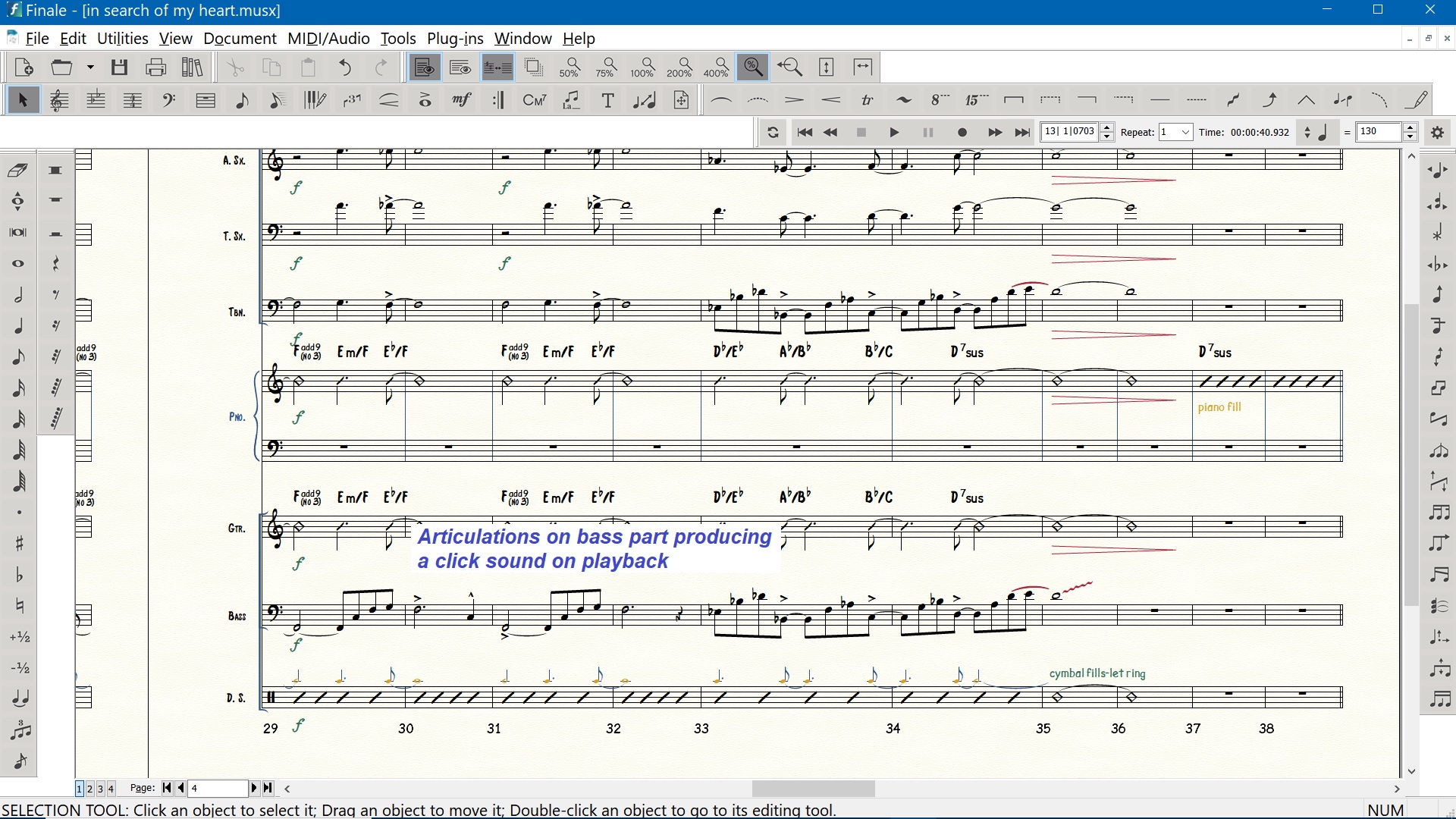
On the bass part in an arrangement I get a clicking noise when notes with articulations are played back. Remove the articulation and the noise goes away. This is not happening on the other parts. I've also had this happen in other files.


Any help is appreciated. Thanks!

8 comments

Date Votes
Avatar
1
Comment actions Permalink
Avatar
0

Which articulations?

Comment actions Permalink
Avatar
0
Comment actions Permalink
Avatar
0
Comment actions Permalink
Avatar
0

Submitted this problem to the Finale team. 

Comment actions Permalink
Avatar
0
Comment actions Permalink
Avatar
1

Resolved.


Hi Gordon,


Glad you have it resolved but we are other users, not MM employees. As such, we cannot see the details of your support case. If you would please post those details, that will help others. We don't need everything or any of your personal data, just enough to know the cause of the problem and the solution. 


If you edit the title of your original post to add (resolved), that will also help others.

Comment actions Permalink
Avatar
0

The problem is a bug with the jazz fretted and upright bass sounds.  Here is the solution.

I picked a different bass sound to solve my problem.

=========================================================================

Hi Gordon,

Thank you for contacting MakeMusic customer support. I can definitely help you here. 

I wanted to start by mentioning this is a known issue with Finale where the "tick" will playback on articulations with high velocities. Thankfully, you can fix the issue in a couple different ways. 

1. I was able to fix the "tick" you're hearing by limiting the key velocity for the Jazz Fretted Bass KS. This can be done by selecting the MIDI Tool from the Special Tools Palette. 

  • Select Window > Special Tools Palette to show Finale's Special tools.

  • Choose the MIDI Tool ​​ and click to the left of the Bass staff to select the entire Bass staff. 

  • Then choose MIDI Tool > Limit from the top menu options. 

  • Under the And a Maximum category change the "127" to something like "120" and this should fix the "tick" in your playback.


Please let me know if this is unsuccessful. You can also eliminate this "tick" by turning off Human Playback (MIDI/Audio > Human Playback > None). 

2. The other method would be to select a different Bass sound that has a similar timbre, like Jazz Fretless Bass KS from within the Score Manager. 

  • Open Finale's Score Manager by pressing CTRL+K on your computer keyboard and under the Sound column click where Jazz Fretted Bass is displayed and select Jazz Fretless Bass from the menu options.


Please keep me updated on your results and I hope your day is going well so far.

Best regards,

Daniel G. | Customer Support Representative | MakeMusic, Inc.

  •  

  •  

Gordon Malone Monday at 15:00

Daniel,

Thanks for the quick reply.

The Midi tool is on the "advanced tools" palette. I think I found
another bug. I changed the Limit values to 0 and 0, click okay.  The
tick was still there. I checked the Limit values and they reverted back
to the defaults of 0 and 127 no matter how many times I tried.  So this
option didn't work.  See attached screen shot.

Turning off Human Playback stops the tick as did changing to any bass
other than Jazz Fretted. That takes care of the tick problem - almost.
The upright bass sound will tick on some but not all of the
articulations in the example I sent.

This also solved another problem where the Garritan sounds were not
loading so adding any notes or playing produced no sound. After the bass
was changed from Jazz Fretted the sounds are loading. Before I noticed
this I had to go to MIDI/Audio, change the playback to MIDI then change
it back to VST.  There is an intermittent problem there as well.
Sometimes Finale will lock up when changing from VST to MIDI.  This same
behavior happens on other files.

If you want to troubleshoot the other problems let me know. Otherwise we
can call this one resolved.

Thanks,

Gordon

  •  

Daniel G. Tuesday at 11:56

Hi Gordon,

That issue you noted with the Limit function is expected behavior as the numbers default when you open that window. That being said, you may be able to solve the issue of the tick by selecting Scale from the MIDI tool options as well and manually change the key velocity to a number less that 64, I was able to remove the tick by setting this to 50. 


With all this, the switching between MIDI and VST's may not be necessary either. If your sounds are not playing back you can select MIDI/Audio > Reassign Playback Sounds to refresh the audio devices used in your document (note: this should be done while Play Finale Through VST's is selected). 

​You are correct that the Upright Bass is also affected by this bug. 

If you continue to encounter issues I would encourage you to submit a request for any separate topics so we can better categorize the problems our customers are facing. Either way, I am eager to hear about any results you find relevant.

Best,

Daniel G. | Customer Support Representative | MakeMusic, Inc.

Gordon Malone Tuesday at 12:28

Thanks, Daniel.

I learn a little more about Finale almost every day. There is a lot of
stuff going on.  I appreciate the great customer support you guys have!

You can consider this case resolved.

Gordon


Comment actions Permalink

Please sign in to leave a comment.