New post
Avatar
0

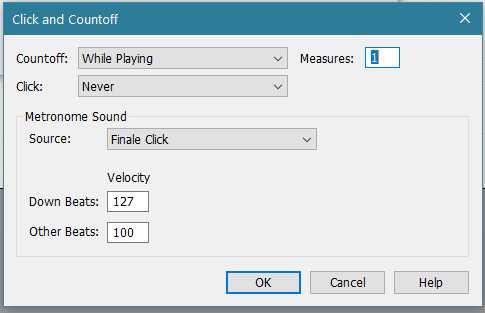
I want one measure only of click and countoff, but the feature continues clicking through the entire composition. Is there a way to remedy this?

Using Windows 11 and Finale 27.

6 comments

Date Votes
Avatar
0

Set it up on a separate percussion track?

Comment actions Permalink
Avatar
0

This will do what you want

Comment actions Permalink
Avatar
0

It worked!  But now another issue: The composition is in 4/4 with a quarter-note pickup. It gives me 4 clicks, followed by 3 counts of silence, then the pickup note.

Can I get it to give me 3 clicks, then the pickup note?

Comment actions Permalink
Avatar
0

… Can I get it to give me 3 clicks, then the pickup note? …


I could be wrong, but I suspect that the number of clicks must be an entire measure, in the current time signature.

That is: 4 clicks when the time signature is 4/4.


Hence:


1) Do not use the Finale feature Pickup Measure.

Go to

Document menu > Pickup Measure…

and clear the pickup.


2) Time Signature Tool.

Set up the first measure as a 1/4 measure, displaying a time signature of 4/4.
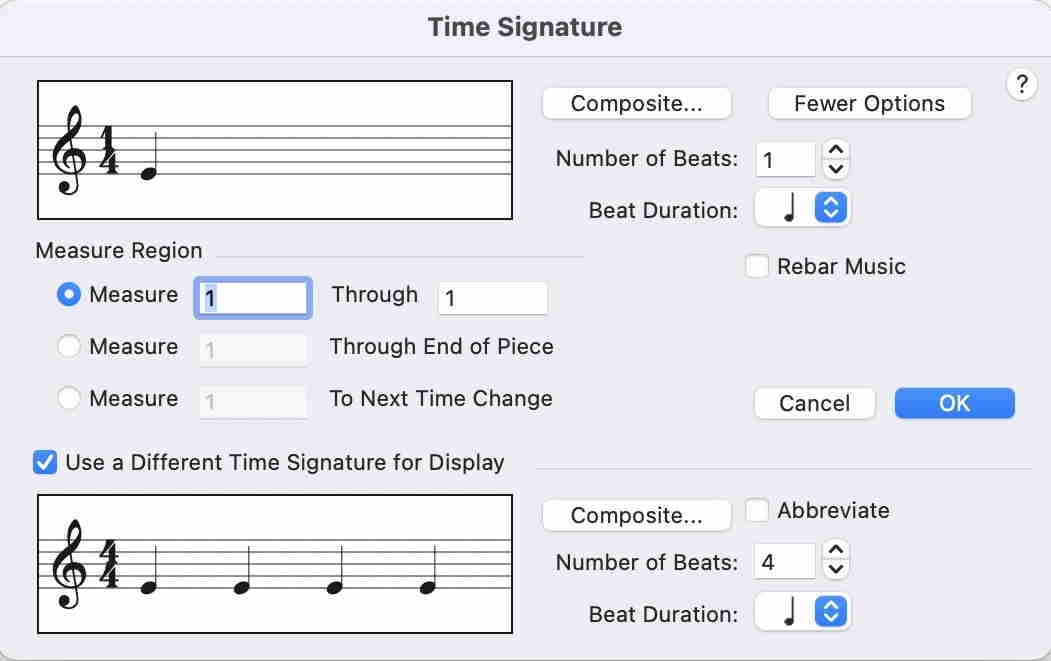


3) In the dialog Click and Countoff, set the Countoff to 3 measures.

Then the Countoff will be 3 measures of 1/4.

Comment actions Permalink
Avatar
0

It works!  But now I tried exporting it as a wav file, only to find the countoff clicks are not audible. Is there a fix?

Comment actions Permalink
Avatar
0

If you want the clicks to export, then you have to built that into a percussion track (as Mike R suggested).

You can always remove the extra before printing (or keep separate files) if you wish.

Comment actions Permalink

Please sign in to leave a comment.