New post
Avatar
0

Unless I've been blocked from this community because of the warning I posted about the 25.4 update corruption issue, I'm gonna try posting this question again.


Due to said file corruption issue last week for some of us on Windows 7 with the 25.4 update, I'm having to migrate a huge project that I started in 25 back to 2014.5 (and which I'm now about 2/3rd through). The only major issue I face is that in 25 I was displaying the score in concert pitch while maintaining the octave transpositions of the piccolo, banjo and doublebass. 2014.5 does not offer the latter option. Meaning I'm either switching views constantly, or dealing with my piccolo and doublebass at concert pitch, which is at best confusing.


My only options seem to be create staff styles to address this, which means going back through the existing 19 documents and applying them. Am I missing something? Is there a better, easier, faster option?


And if I am going to be blocked from this forum, someone please tell me so I can not waste my time.


Thanks.

15 comments

Date Votes
Avatar
0

The octave transposition feature you enjoyed in Finale v25 does not exist in Finale 2014.5. I'm not sure what you expected to happen.

Comment actions Permalink
Avatar
0

I didn't "expect" anything, Adrian. I simply asked if there was something comparable in 2014.5, or a simple workaround.

Comment actions Permalink
Avatar
0

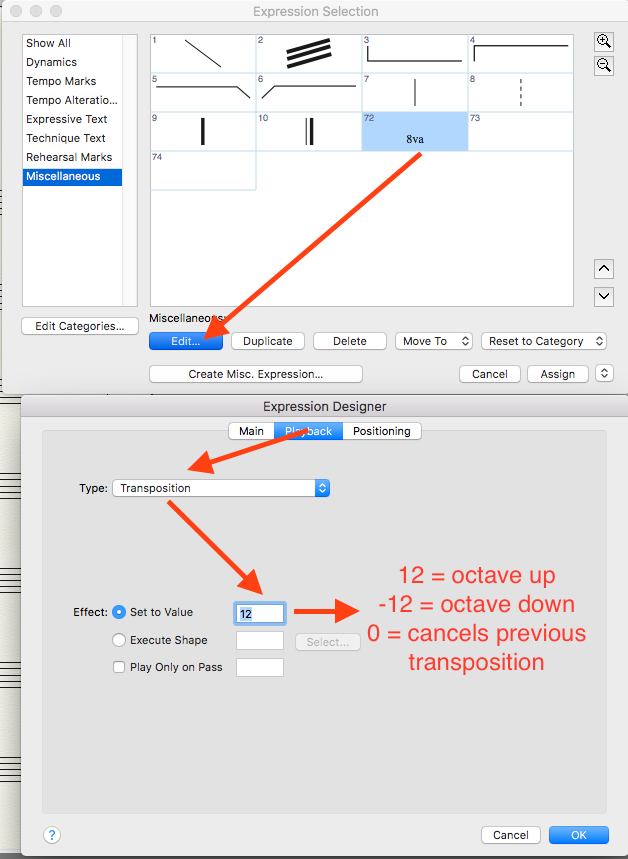
The only thing I can suggest is, say for your bass stave on the score, enter the music as the player would see it written on the part. If playback is a concern, this will result in the pitches being an octave too high. To fix playback, enter a hidden expression at the first measure that has the playback tab set to "Transposition - One octave lower". Do the same for piccolo and banjo, but one octave higher. If the piccolo doubles with flute, you'll have to add the expression when the piccolo plays and a cancelling expression where flute plays.

Comment actions Permalink
Avatar
0

Bruce, wouldn't this mean I have to drag this expression across the entire part through the score? Which in some cases is many, many pages which would be cumbersome? If so, wouldn't a hidden staff style be faster?


Thanks.

Comment actions Permalink
Avatar
0

Ed, the expression takes effect on whatever note it's entered and remains in effect till the end of the score or until a cancelling "zero" expression is entered. I don't know what you mean by dragging it. Yes, a Staff Style might work as well but the expressions are what I use and find them to be convenient.

Comment actions Permalink
Avatar
0

Ah, OK, I think i was thinking a Smart Shape, I forgot you could do this as an expression (I never use the 8va expressions).

Comment actions Permalink
Avatar
0

Do you no longer have the 25.3 installer file? That worked for you, yes? If so (or you can get it from someone) you can rename 25.4 by adding the version number so that 25.3 doesn't overwrite. Both would now work (ignoring your issues with 25.4, of course).


I don't download the Win installers or else I'd make it available via Dropbox or FTP. Otherwise, I think that MM Support could get you a download link to the last version that was successful for you.


Speaking for myself, I always rename the current install when the next version is released so that I can give it a good shakedown before discarding the older version. I do this with any application that is critical to my work.


I know that hindsight is always 20-20 but this isn't the last application or update you will ever encounter. Software and operating systems are just too fickle to imagine this can't/won't happen again with something, sometime. It was Encore and Digital Performer that taught me the value of this approach, not Finale but still...

Comment actions Permalink
Avatar
0

Hi Mike,

I would have had the 25.1 or 2 installer, and like you I don't keep them, too much clutter. Both. 3 and .4 were, I think, automatic system upgrades that I don't recall coming with a downloaded installer. I could be wrong on that.

What effect would renaming the installation have or have had? I don't think it would have effected the file corruption issue, no?

You are now about the 30th person to tell me that I clearly don't back up 1) correctly or 2) often enough, LOL. I do religiously back stuff up weekly. As this issue occurred while I was in the middle of a major rewrite on a very tight deadline in between scheduled backups, the entire rewrite was lost.

Under the circumstances, i have no interest in attempting 25 again, in whatever iteration. The few differences from 2014.5 were negligible, and I've spent months with MM trying to solve playback issues, only one of which has been solved. I've probably wasted more time trying to figure 25  out then getting anything seriously accomplished on it, and I've now got to much catch up to do given the corruption issue to really care.

Comment actions Permalink
Avatar
0

>What effect would renaming the installation have or have had?<


Every update installs as Finale and overwrites any application with exactly the same name (some apps will not install if a newer version is present; no idea if this applies to Finale). Anyway, renaming the older version to, say, Finale 25.2, will cause the installer to add a new application called Finale. You can open and save your documents in both versions. When satisfied that the latest is good, discard the older build. If 25.2 worked fine and 25.4 did not, then you could pursue the tech issue on the newer build while still having the older available.


> don't think it would have effected the file corruption issue, no?<


Correct but it shouldn't affect the functionality of the older build. I could be wrong on this.

My Win7 machine is 32bit so I have not installed 25 onto it. As much fun as hunting down problems like this can be, I draw the line at buying another PC just for the task. Living in the midst of the Silicon Valley, it is not unusual for people to say, "Mike, you like working on computers, can you use ...?" so it could happen someday.


A little about me: I am known to be a conduit for those who don't know what to do with old hardware. Some I can fix up and donate to schools; for others, I know where the recycling programs are so that they don't wind up in land fill. I have a small side business where I service and maintain Macs for a few clients. I use to be in sales and support for a Windows applications company and worked in UNIX for a couple of others. My day job is in the music industry.

Comment actions Permalink
Avatar
0

My solution for this is in the Score Manager to set the first clef to be an octave clef, then have "set to clef" in the instrument definition set it to the usual clef when the score and parts are displaying transposed.

For example, my first clef for piccolo would be the 13th clef in the default, the treble clef with an 8 above it in the second row.

Then in Transposition I select "other" and set it to display 8vb (should already be set) and set the clef (very important!) to be a normal treble clef.

For double bass my first clef is the bass clef with the 8 below, and I do the same trick with Transposition.

No need to mess with Staff Styles, which never seem to copy properly (or do when you don't want them to, like when you copy material from staff to staff.) This also shows EXACTLY which octave you are in if you are writing a C score, which is always a problem for me under normal circumstances.

I am actually still using this method in V25, because I can enter the WRITTEN pitch instead of having to enter very low or very high notes using Speedy.

Comment actions Permalink
Avatar
0

Interesting, Chrisopher, I might try that. Thanks.

Comment actions Permalink
Avatar
0

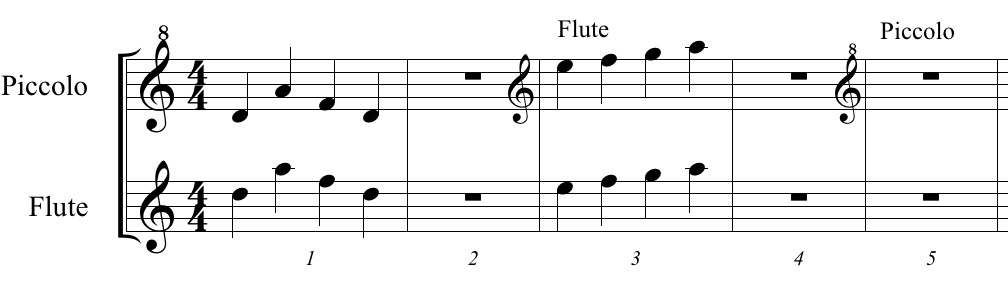
Note, however, that Finale will display a {clef change} clef at each switch between Flute and Piccolo, since the clefs are different (even if the two different clefs display the same clef symbol/font character).


You can hide the clef, obviously - that is just a little extra work.

Comment actions Permalink
Avatar
0

Note to the note, however, that this only applies in the C score, which in my opinion is warranted, since it ISN'T the same clef. The piccolo clef is the treble clef with an 8 above it, while the flute is a regular treble clef. This is the advantage of my method, that you can instantly see the difference between a C score and a concert score. You don't have to guess which octave is intended.


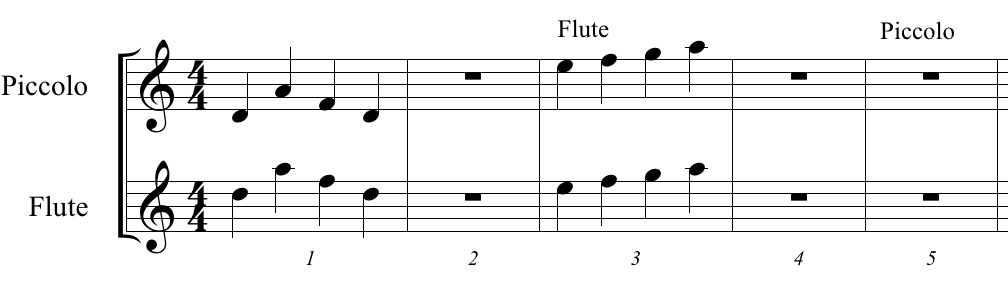
The parts and a transposed score will both display and print in ordinary treble clef without showing a clef change. Below are two staves with a perfect unison. The first example is a transposed score. The second is a C score with the clef changes.

Comment actions Permalink
Avatar
0

>The piccolo clef is the treble clef with an 8 above it, while the flute is a regular treble clef. <


I like it but can't say I've ever seen a score that used it.

Comment actions Permalink
Avatar
0

Yeah, well, I went many, many years without seeing a "C score" and I find it inherently confusing to figure out whether the octave transposing instruments are in the sounding octave ("concert score") or written octave ("C score"). Anything that can clarify the notation I am in favour of.

Comment actions Permalink

Please sign in to leave a comment.