New post
Avatar
0

Windows 10, Finale 26

OK, I am sure I already know the answer, but can Finale do hyperlinks withing a document?

MS Word can, just as on a web page:  create a "target" and then link to that target.

It would be very useful to set up a short list of sections within a work and then be able to go directly to it with a simple click.

I know I can do a Ctrl+Shift+G.

Thank you!
:-)
Vanessa

10 comments

Date Votes
Avatar
0

>OK, I am sure I already know the answer, …<


Really? Sometimes, all you have to do is type the search term into the User Manual to find out.

https://usermanuals.finalemusic.com/FinaleWin/Content/Finale/db-hyperlink.htm?Highlight=hyperlink 


Hyperlink dialog box


How to get there

  1. Choose the Text tool . The Text menu appears.
  2. Double-click the page to create a text block or double-click an existing text block and highlight the text.
  3. Choose Text > HyperLink..

What it does

This dialog box allows you to define the display text and URL for a hyperlink in your document.

  • Display Text. Enter the text you want to display on the page. If you are adding a hyperlink to existing text, it appears here.
  • Link Address. Enter the URL for the hyperlink. Finale adds https:// if necessary when opening the link using the system's default Internet browser. To test the hyperlink, click outside the text block with the Text tool  and CTRL-click the handle.

    Alternatively, hover over the link with the Selection tool  and CTRL-click the link.

  • OK • Cancel. Click OK (or press ENTER) to confirm, or Cancel to discard, the changes you’ve made and return to the score.

See also:

Text

 
Comment actions Permalink
Avatar
0

Hi Mike,

Thank you for your reply.

Perhaps I did not make clear how I wish to use the hyperlink.
Yes, I had done the search and read how to create a hyperlink BUT from my understanding that is for creating a link from within a Finale document to somewhere on the web.

What I would like to do is to create a hyperlink that will take me to a place WITHIN the same document, similar to how Ctrl+Shift+G will do.

The difference is I can make a list of links to sections within the same document and then be able to go directly to them with a simple click.

:-)
Vanessa

Comment actions Permalink
Avatar
0
Comment actions Permalink
Avatar
0

Hi Mike,

Thank you for your input.

Yes, very much like Bookmarks in Scroll View, but closer to the "Go to Measure..."

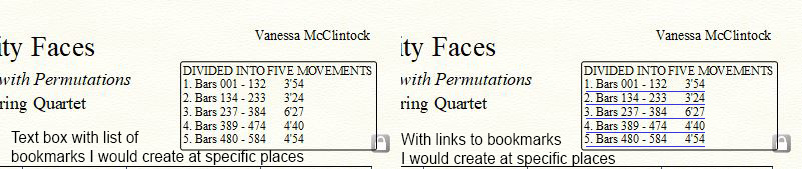
I would like to hyperlink to bookmarks that I can designate at any given measure and then list in a text box:

The effect would be the same as the "Go to Measure..." but quicker.

:-)
Vanessa

Comment actions Permalink
Avatar
0

Vanessa,


From your description it sounds like you are sure, you will always be at one specific measure in the document, when you need to go to the “link target”.


Finale’s Bookmarks are more versatile since they are available, no matter where you are in the document.

Indeed the Bookmarks could be quicker.

Personally I would love the option of having the Bookmarks sub-menu available as a floating palette I could position anywhere on the computer screen.

Comment actions Permalink
Avatar
0
Comment actions Permalink
Avatar
0

Just to clarify for my benefit: these links would be meant to work only while one was working on a document within Finale, right?

They would not automatically transfer to a PDF file.


Do I have that right?

Comment actions Permalink
Avatar
0

The script only enables you to navigate to the bookmarks you have created in a Finale file. Nothing to do with PDFs.

Comment actions Permalink
Avatar
0

Michael,


I should have made clear that I was asking about Vanessa's idea rather than yours.

Comment actions Permalink
Avatar
0

Hi guys,

Thank you for your feedback and comments.

Very helpful.

It would be nice if the hyperlinks/Bookmarks/Go to measure would carry over into PDF!

:-)
Vanessa

Comment actions Permalink

Please sign in to leave a comment.