Hi. Have you problems with AZERTY Keyboard using Speedy Entry mode? On my new MacBook Pro M2 it does not work at all for entering note values using number's keys. Any idea? Thank you!


The MacBook Pro doesn't have a numeric keypad, and on the Mac, the number keys on the main keyboard do not work with Finale. For instance, in Speedy, defining note durations, creating triplets with the main keyboard (alt+3) is impossible. And the Tuplet Definition window is not accesscble via alt+1.
Workarounds :
1) get an extended keyboard with a numeric keypad and connect it to the MacBook Pro via (USB or Bluetooth if it is wireless)
2) get an external numeric keypad
3) emulate the keys of the missing keypad with Keyboard Maestro (Mac only) using a key combination on the main keyboard
4) if you have an iPhone, an iPad, get an app that emulates the missing numeric keypad.
Numpad has a dedicated Finale keypad layout.

...and on the Mac, the number keys on the main keyboard do not work with Finale. For instance, in Speedy, defining note durations, creating triplets with the main keyboard (alt+3) is impossible. And the Tuplet Definition window is not accesscble via alt+1.
I've used option(alt) +number within speedy to create all types of tuplets on my MBPro for decades - no extended keyboard. I'm not sure what you mean by "do not work"...
Update : my intuition was correct : in the System Preferences of the Mac, I changed the keyboard from "Français" to American English, and the numeric keys now work as they should on the main keyboard.
The problem is that I now have a Qwerty keyboard, and I need the French Azerty, for the familiar position of keys and easy access to accented characters (I speak French).
Thank you, your post pushed me to investigate.
But I'll revert to my French keyboard, and luckily enough, I have an extended keyboard with numeric keypad.

Michael,
Glad you figured it out...
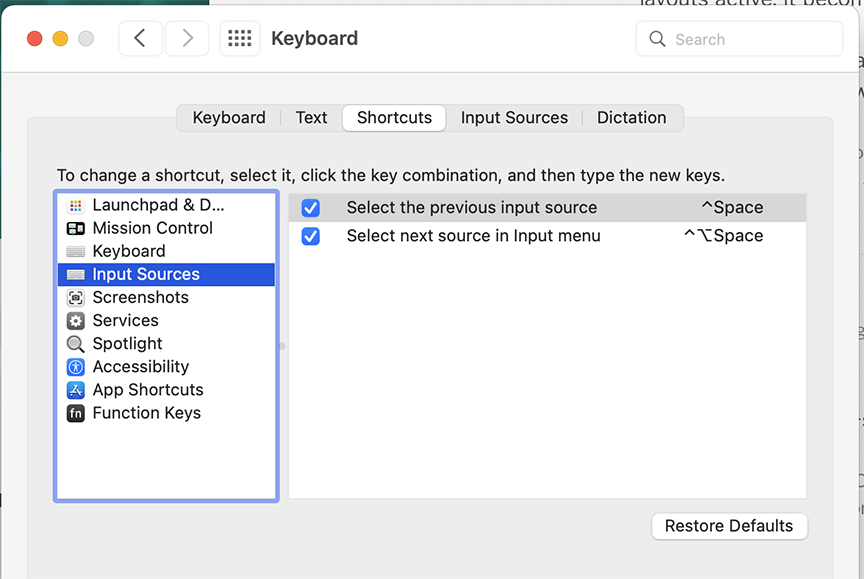
If you will be frequently switching back and forth between these two keyboard layouts, you could use the built in keyboard shortcut to do so - press control+spacebar and the layout switches to the previous keyboard input source. If you only have two layouts active, it becomes a toggle between the two.
The change is instant and is confirmed by a small notification that pops up in the middle of the screen showing the existing keyboard layouts and which one is active.
Please sign in to leave a comment.
12 comments
Date Votes