New post
Avatar
0

I'm not able to create a 3/2 time signature.
What I do is: Click the Time Signature Tool button | In the upper stave, select the measure I want the 3/2 time to appear | Right mouse click - menu appears. The 3/2 time is not in the time signature menu list. When I try to click the 'Edit Time Signature' option, nothing happens. Any suggestions? Thanks!

22 comments

Date Votes
Avatar
0

Time Signature Tool.

Double-click the measure where you need to change the time signature.

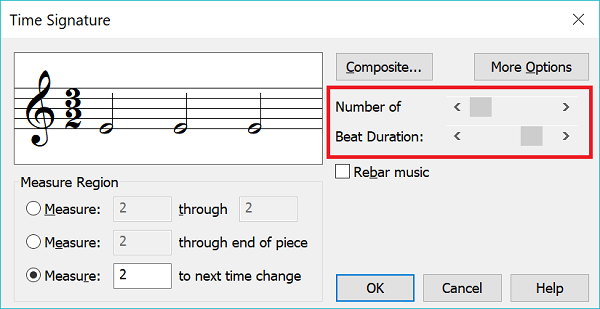
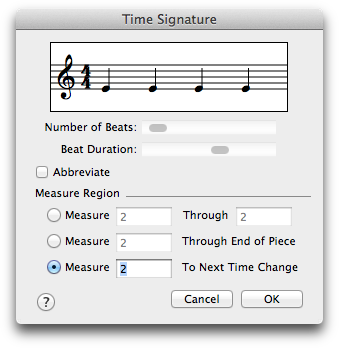
The dialog box Time Signature appears.


If the dialog box Time Signature does not appear, then there is something wrong.

As a first step to try, quit Finale, and launch it again.

If that does not help, try a re-boot.

If that does not help, quit Finale, and remove Finale’s Preferences file. Then launch Finale again.

Comment actions Permalink
Avatar
0

@Peter: Thanks for your reply. If I double-click a measure with Time Signature Tool active, nothing happens. Nothing ever did, for that matter. I only see a list with time signatures to choose from after a right mouse click. Re-lauching or re-booting doesný chane this. How do I remove Finale's Preference file? Can this be done without destroying my score?
Thanks!

@Peter, p.s.: I received your reply to another post (Text block attachment to measures) via e-mail the other day. Thanks for replying! I couldn't reply back though since your post is not visible here online. ?

Comment actions Permalink
Avatar
0

Excuse the typo above: "doesn't change this."

Comment actions Permalink
Avatar
0

Just found out that a time signature list only appears after double-clicking a measure when I'm in Studio View. All other views only show the list with a right mouse click (but no activity on the 'Edit Time Signature..." field).

Comment actions Permalink
Avatar
0

Correction on my post above: when double-clicking a measure in Studio View, the 'Edit Time Signature' option becomes active. The time signature list (without a 3/2 time btw) also only appears in Studio View after a right-mouse click.

Comment actions Permalink
Avatar
0

Why not just create the time signature you want with the time-signature tool?


If the sliders don't work in your version of the problem (IIRC you have never said what version of Finale you are using) then use the Composite Option to set the time sig.


Comment actions Permalink
Avatar
0

… How do I remove Finale's Preference file? …

What operating system are you using?

The exact location of the Finale Preferences file depends on the operating system.


However, you can also (in Finale) go to the Preferences, and click the button “Reset All Preferences”.


… Can this be done without destroying my score? …

Yes.

Comment actions Permalink
Avatar
0

3/2 is not in the time signature drop down list. Adrian has the correct way to do it.

Comment actions Permalink
Avatar
0
Comment actions Permalink
Avatar
0

@Adrian V.: Thanks for your reply. I realise this would be the proper way to do it and I did (sliders work). However, it is only possible when I'm in Studio View, which seems odd. There is no way I can make the Time Signature window appear in other views.
I'm using Finale 25.5.0.290 btw.

Comment actions Permalink
Avatar
1

>There is no way I can make the Time Signature window appear in other views.
I'm using Finale 25.5.0.290 btw.<


That's strange. I have no trouble bringing it up in Page, Scroll or Studio views.


Was this file created in an older version of Finale?

Comment actions Permalink
Avatar
0

No, made in Finale 25.5.0.290. But it was originally made in another notation program and imported as an xml file.

Comment actions Permalink
Avatar
0

That makes sense. I bet that a new file will not have this issue. You can test that by creating a two or three page blank score. The one I looked at was originally done in Finale 1998. 

Comment actions Permalink
Avatar
0

@Peter T.: Sorry for the late response. Thanks for your tip! I haven't tried it yet but I will. Possible reason for this problem is probably (also) the fact the score was originally imported as an xml-file.

Comment actions Permalink
Avatar
0

And was that XML file from a scan?

Comment actions Permalink
Avatar
0

@Mike R.: Thanks for your reply.
No, the xml file was exported from a different music notation program and then imported in Finale 25.5. I now know that this is not an ideal way to go since it causes multiple problems but I had no choice this time, the score was too big (and my Finale-experience too small :-) ) to copy it note by note.

Comment actions Permalink
Avatar
0

I just opened a new file, selected he time signature button and double-clicked the first measure, as I've done a million times. The time signature window doesn't open. Same with the key signature tool. I've re-started finale 3014.5.6359, no help. Same with articulation tool. click on note - nothing. Then &PED. appeared, all on its own. 

Comment actions Permalink
Avatar
0
Comment actions Permalink
Avatar
-1

Sorry for breaking the rules. I'll just keep banging my head against the wall. Maybe that will work. 

Comment actions Permalink
Avatar
1

It has nothing to do with rules and everything to do with our collective inability to see what’s going on with your system, especially when you haven’t told us anything about it.

Comment actions Permalink
Avatar
0

Walter Koehler,


Just a “wild guess”:

Are you using Finale 2014 in Windows 10?

Comment actions Permalink
Avatar
0

Did you try restarting the computer (whatever it is?) If that doesn’t work, recreate the preference file.


And looking at the signatures in the posts above and below yours, do you see why we have those rules?

Comment actions Permalink

Please sign in to leave a comment.