New post
Avatar
0

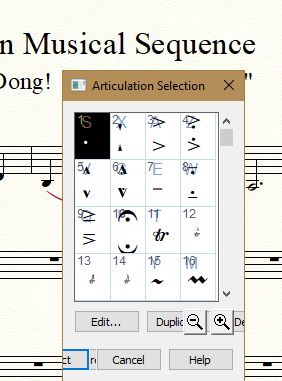
Articulation Tool window opens up small (condensed).  I've tried rebooting and resetting preferences to no avail.  I can work-around by dragging the window fully open each time but, dang is it ever annoying.  I appreciate any help on how to solve this. 
 

6 comments

Date Votes
Avatar
0

Finale version? Computer OS?

Comment actions Permalink
Avatar
0

I should have included that info.  Finale 24 and most current Win10.  Thanks!

Comment actions Permalink
Avatar
0

Todd Martin,


You probably mean that you have Finale v25.


You tell that you have tried “rebooting and resetting preferences”.

By your words “resetting preferences” you mean that you - in the Preferences - have clicked the button “Reset All Preferences”, right?

Clicking the button “Reset All Preferences” will make Finale write the factory settings into the Preferences file.

However, that step may not cure a corrupted Preferences file.


Have you tried trashing your Preferences file?

Comment actions Permalink
Avatar
0

Thank you Peter. Yes - v25.  After rebooting, the Articulation Tools and Expression Tools windows will open up full-size on first use but reverts back to the tiny scrunched window each time after that.  Hopefully trashing my preferences file will resolve the problem.  If it works I will share to help others with the same problem.  

Comment actions Permalink
Avatar
1
Comment actions Permalink
Avatar
0

Hi Todd,


Thanks for reporting back your results. This helps others with the same issue.

Comment actions Permalink

Please sign in to leave a comment.