New post
Avatar
0

EVER. Under any circumstances. For any reason.


Why is this "feature" on by default? Where can I turn it off? And if you tell me to make templates with it turned off, I will yell and scream. I WANT IT GONE.


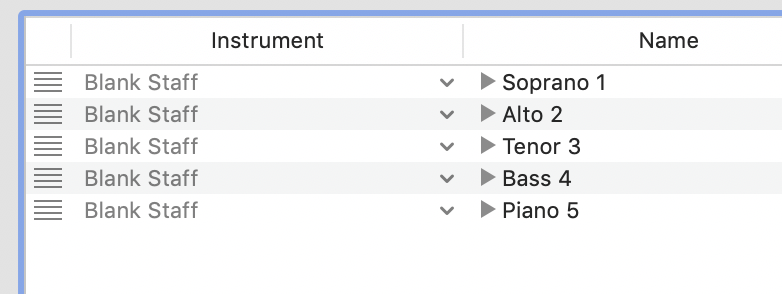
I am setting up my own templates. It's bad enough that I have to go through three screens to name the instrument, name the abbreviation, and select a clef (if it isn't a G clef.) All of that, and the instrument selection, should be on a single screen. THERE IS NO REASON FOR ME TO HAVE TO CHECK ANOTHER BOX, TO GET RID OF SOMETHING THAT I DIDN'T ASK FOR. If I have two sopranos, I'm certainly smart enough to name them 1 and 2. And I don't have 3 tenors, 4 basses, or 5 pianos. This is STUPID.
10 comments

Date Votes
Avatar
0

Mike,


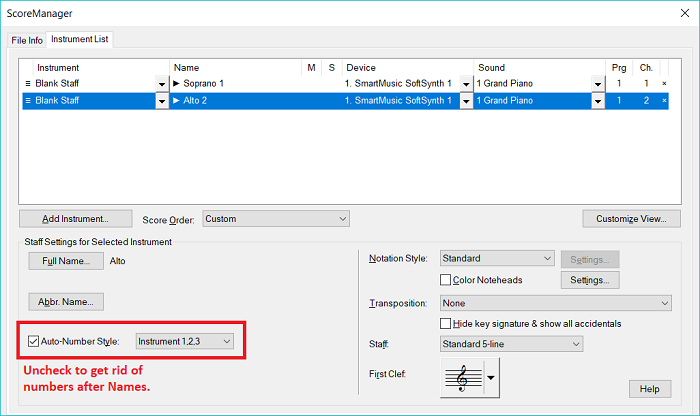
I'm not sure how this appears on a Mac, but in the Score Manager there is a checkbox that controls numbering the parts. I have not found any way to turn it off in preferences. Part of the reason for the numbering is the identical Blank Staff choice in your leftmost column. Identical choices there seem to prompt the program to number the part names even if they are different.


Comment actions Permalink
Avatar
0

It works the same way on a Mac, Adrian. But you have to turn it off for each staff you add. Even, in your example, where the parts are not the same: you show Soprano 1 and Alto 2. It’s absolutely ridiculous that this A) is on by default, and B) that it applies to non-doubled parts.

Comment actions Permalink
Avatar
0

Uh yea, this is something that should have been caught and killed in beta. 

Comment actions Permalink
Avatar
0

Mike Rosen,


Are you using the Instrument List (like in Mika Halloran’s example)?

Or are you using the Document Setup Wizard?


What is needed (in the Instrument List), could be a button saying “Instrument List Options…”.

Click the button, and you would get to a dialog box where you could set various default options for the Instrument List, like whether “Add Instrument” by default should should de-select “Auto-Number Style” for an added instrument.


By The Way:

If you use the Staff menu to add a Blank Staff, then by default “Auto-Number Style” is de-selected.

Comment actions Permalink
Avatar
0

I believe what J ADRIAN was saying, and what appears to be how it works, is that because you have "blank staff" for all the instruments, Finale identifies each as a duplicate regardless of what staff name you assign it. If you select the appropriate instrument, you won't get this. I agree that there ought to be a setting to turn off auto-numbering in one swoop.

Comment actions Permalink
Avatar
0

I add the staves as blank, because I want a piano sound. The problem is the same, whether you use the Wizard, or the Instrument list. I don’t want the choir oohs and aahs that you get when you add them as Soprano, etc.

I will certainly try Peter’s suggestion about the Staff menu. 


What is needed: when you add a staff, or select one in the Instrument list, is a dialogue box containing Full name, Abbrev. name, clef, transposition, playback sound - in short, everything that now changeable, in one place. You make all of your setups, and press OK.

Comment actions Permalink
Avatar
0

Ever since Finale altered their instrument selection system so that playback on different computers would search for and find the closest instrument choice to the original selection (was that 2012?) it has been the leftmost column of the Score manager that determines a lot of presets for the music. Although one can rename an instrument in the Score Manager (in column 2), the HP settings and significant XML export info depend what instrument one has selected in the leftmost column. That doesn't mean there are not drawbacks.


I would select the S A T and B parts in the leftmost column and then change the instrument sound to piano (or whatever one wants) rather than doing it the other way around. It is still extra work, as is changing the name of blank staves in column 2; and certainly, Mike, with all the experience you have, I'm not going to second guess what works best for you. Certainly the vocal sounds are problematic, a situation common to almost all sound libraries I have tried.

Comment actions Permalink
Avatar
0

I'll give that a try. Anything that reduces a step of frustration is a win, IMO.


Thanks!

Comment actions Permalink
Avatar
0

Mike, given your workflow and musical genre, I am sure that setting is a nuisance for sure. In most cases this numbering goes unnoticed though. Adrian's solution will probably save you several steps as choosing the appropriate option in the Instrument column will most likely mean that you will just to change the playback sound.

Comment actions Permalink
Avatar
0

There should be a preference to turn off Auto Numbering.  It messes up almost everything I do.  It is pretty simple to uncheck each box - BUT, it would be more simple to have a auto numbering preference for new instruments.

Comment actions Permalink

Please sign in to leave a comment.