New post
Avatar
1

Greetings all,

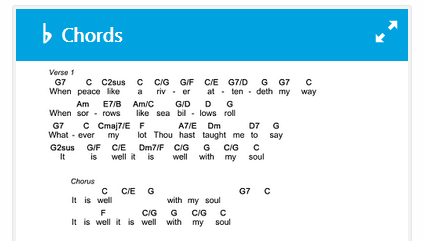
Is there a way to automatically convert a lead sheet to a chord/lyric chart? I want to be able to write out a lead sheet then export it with just lyrics and chords while maintaining the spacing of the chords and lyrics. Is this possible? If you are familiar with SongSelect by CCLI I am essentially looking to create lead sheets and chord charts like the ones they have.


Windows 10, Finale V25

26 comments

Date Votes
Avatar
1

I am not sure what you need. (I am not familiar with SongSelect)


You can use the Staff Tool to hide the items you do not need.

You can hide the notes by using an Alternate Notation called “Blank Notation”.

You can also hide (or rather: not display) staff-lines, barlines, clefs, key signatures, time signatures &c.

Comment actions Permalink
Avatar
2

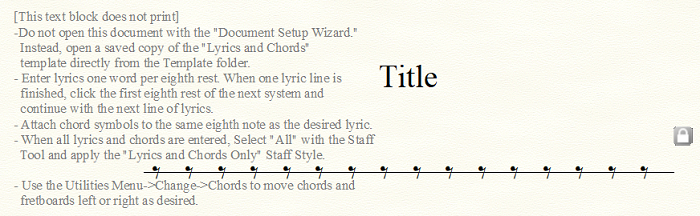
I don't think so. There is a template (in the General templates folder) that is called Lyrics and Chords, but I can't find a way to enter anything by copy and paste from an existing doc. You may have to re-enter the data manually.

Comment actions Permalink
Avatar
0

Okay. I think I'll turn this into a feature request then. Thanks!

Comment actions Permalink
Avatar
0

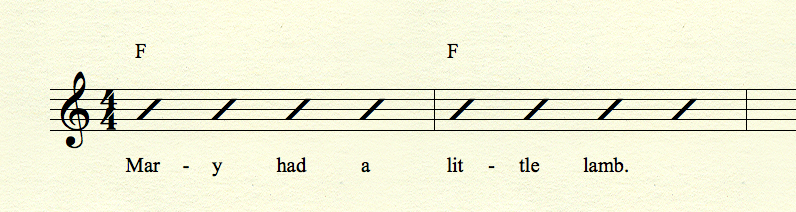
Have you tried simply applying the slash notation staff style to the whole thing and see if that's what you're looking for? Make sure you checkmark to allow lyrics and chord symbols display when using this staff style.


Comment actions Permalink
Avatar
0
Comment actions Permalink
Avatar
0

Adrian is correct. The idea is to have just the words and chords. I can make chord charts in a program like Word but why spend the extra time if there's a feature in Finale that would let me do it quicker... Also, if I can do it in Finale that means I can also transpose the chord chart for those who use transposing instruments or a capo without having to re-space or type every chord in a word document.

Comment actions Permalink
Avatar
0

That’s what the Lyrics and Chords template does. But as I said, I can’t find a shortcut from an existing lead sheet.

Comment actions Permalink
Avatar
0

I found this in the Templates folder on my (Windows) machine.


Comment actions Permalink
Avatar
0

Didn’t I mention that, twice?

Comment actions Permalink
Avatar
1

My only suggestion is to begin the chart in the Lyric and Chord template. Save a Copy and expand that to a lead sheet. Can't say I've ever done it, though.


I arrange and do charts for a number of folk bands where no one reads. Always done my lyric/chord sheets in Word. Might give it a shot, though. Never thought of being able to transpose later.


I can't stand those charts in SongSelect. They're over-complicated and so often wrong that I've always found them useless.

Comment actions Permalink
Avatar
1

I have this same question.. this would save me so much time every week if I could simply run a plug-in to convert lead sheets (or voice w/accomp) to chord charts.  I've tried doing the "hide everything" option.. it's too time consuming and doesn't look great when you're done.  I also have trouble with the SongSelect chordcharts.. guitarists don't like the format.  At least Lifeway chordcharts do give you a blank lyrics-only page at the end so you can hand-write chords on there, but I'd prefer my own arrangement's chords in a digital file that can be quickly retrieved and transposed.

Comment actions Permalink
Avatar
0

I have this same issue. Students or younger musicians are willing to read a lead sheet with melody or chords and slashes. However, older hobbyists, church volunteers, or vocalists are sometimes dead set on these "chord sheets". Would love a shortcut or plugin to make this easier.

Comment actions Permalink
Avatar
1

>Would love a shortcut or plugin to make this easier.<


That's the recurring theme of this thread. It isn't here. Considering the amount of programming that would take, I'm pretty sure that MM would need to see a ton of feature requests to make this happen — especially since no other notation app has this functionality. If it was easy to add, they all would have added it years ago.


Since this thread was started, I have now taken on two church jobs. Only one has me directing a praise band, however. As choir director at the other church, I only have to deal with Song Select at one.


Using Preview (pdf reader/editor built into the MacOS) or Adobe Acrobat Pro, I am able to remove the chords (always wrong with Song Select) easily and type in the correct ones. If transposition only, that can be done within Song Select and the .pdf can be re-exported.


I can post a quick tutorial on how to do this in Preview. Pretty quick and I do it 2–3 times per week.

Comment actions Permalink
Avatar
0

Thanks, Mike! I have used Preview, but would really like to have a part that can be transposed in Finale. When I asked a friend about this, he suggested to require the volunteers to learn to read standard lead sheets. Will keep searching.

Comment actions Permalink
Avatar
2

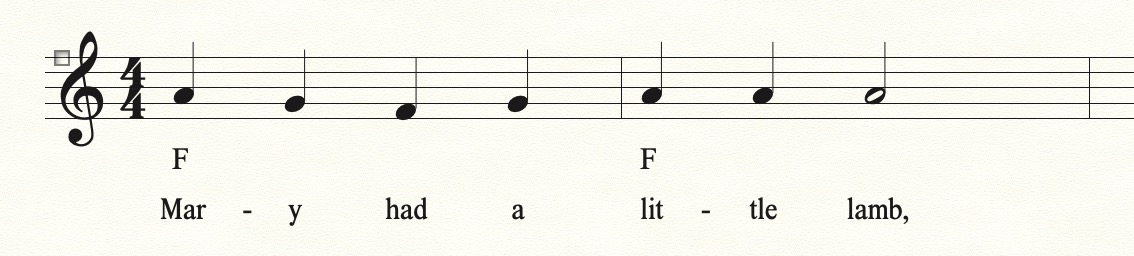
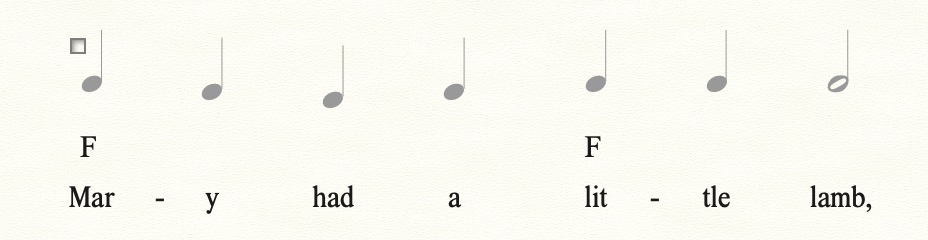
Start with this. Note that I moved the chords below the staff, but above the lyrics.


Use Blank Notation, and also don't display Staff Lines, Barlines, Time or Key Signatures, etc.


The notes won't print, of course.


If you use the Lyrics and Chords template, you can still transpose the chords by changing the key signature.

Comment actions Permalink
Avatar
1

I like that, Mike. The text is spaced out far more than I would like—I know that can be adjusted but…. The goal for me in any such chart is to get it all on one page. Word is easy and I can transpose in the amount of time it takes to type.


>When I asked a friend about this, he suggested to require the volunteers to learn to read standard lead sheets. Will keep searching<


Uh yea… Have your friend search for all those volunteers who read music instead. Volunteers are the lifeblood of any community or church music program. Nobody I know is turning away anyone, let alone make it harder to participate.

Comment actions Permalink
Avatar
0

But why can't the volunteers just ignore the melody line, if it doesn't mean anything to them, anyhow?

Comment actions Permalink
Avatar
0

I agree with Mike: having the notes (rhythms) with the lyrics and chords increases the likelihood that users will start to see the connection between the rhythms and the speed of the syllables as well as between the tune and the ups and downs of the notes. They won't be reading music, but the notes can act as cues for those who find them useful. The others can ignore the notation.

Comment actions Permalink
Avatar
1

I've been looking for this feature, too. To be able to create a "chord sheet" (not a lead sheet), with the lyrics and chords above the lyrics only. 

I've come to the conclusion that IF it's just the chord sheet you need - Finale is a waste of time for that due to what is required to get the final results. It's easier just to take an existing PDF of a chord sheet, and "editing" it. It's easy, fast.

However, IF you are writing "lead sheets", then I would recommend, along with your "lead sheet" (with the melody lines, measures, rests, etc.), your lead sheet becomes a "part" in the score - you could create/add another part and format that part to be your "chord sheet", and IF you wanted to, take it a step further and create a 3rd part for "harmony" - essentially, following the same format that SongSelect (www.ccli.com) uses when going to find a praise song and you have those options to pick the chord, lead, or harmony sheets.

IF you do the above, your chord sheet will cue off of your lead sheet since you would be entering notes, lyrics, and chords above the appropriate syllables of the words. 

Your chord sheet would be formatted to "hide" what you don't want to see and have the appropriate spacing between the chords and lines.

Back to my original statement though - if you ONLY want a chord sheet, I don't believe Finale is the tool for it - you're better off creating a Word Document, adding a table, and one row would be your chords and the next row would be your words. The ONLY disadvantage of doing it this way, is if your guitar player comes back and says, "Hey, can we do this in Db OR better yet, C#?" :) :) :)

Any ways good luck!

Comment actions Permalink
Avatar
0

Timothy, 


Of course, the reason to do it in a notation app is the ability to transpose the chords as in CCLI Song Select.


Any idea what engine is behind Song Select now? Long ago, it was Encore but I suspect it might be Sibelius — for which I don't have a license and don't want one. As I've posted before, I really dislike SongSelect but only because the charts are so often wrong—the functionality is great and it would be nice to have (even nicer to be able to import and edit in Finale directly or through SmartScore 64 Pro).


I agree with Mike: having the notes (rhythms) with the lyrics and chords increases the likelihood that users will start to see the connection between the rhythms and the speed of the syllables as well as between the tune and the ups and downs of the notes. They won't be reading music, but the notes can act as cues for those who find them useful. The others can ignore the notation.


For church bulletins, I'm with you. I want the congregation to always have the melody—but they don't need the chords. For the accompanying praise band, we prefer charts to be on one page if possible or two if absolutely necessary and word/chord charts facilitate this when lead sheets so often don't.


I'll try to summarize this thread and put it in as Feature Request (after making sure that 27 didn't sneak in a way to do this more easily, of course).  This is a real need for many of us.

Comment actions Permalink
Avatar
0

There’s a staff style already there for Lyrics and Chords only.

Comment actions Permalink
Avatar
0

So after 4 years I've found that what I really want is for Finale to export a lead sheet in a chord pro format. Since the chords are already assigned to syllables it should be easy to export as

A[G]mazing [G7]grace how [C]sweet the [G]sound

If I could export a lead sheet in this format it would cut my work load in half.

Comment actions Permalink
Avatar
0

Back to my original statement though - if you ONLY want a chord sheet, I don't believe Finale is the tool for it - you're better off creating a Word Document, adding a table, and one row would be your chords and the next row would be your words.


Agreed — it's a real pain to do in Finale since you have to assign at least a rhythm before you can assign lyrics and chords. Besides, it is much easier in Word or Text. The default for decades is to use Courier or another mono-spaced font. That way, if you change chords, keeping them aligned with the lyrics is much easier.


Maybe someday, an AI implementation can read a text chord chart and transpose but not yet. People are clamoring for this function in the Band-in-a-Box forums and are disappointed that 2024, released last week, doesn't have it.

Comment actions Permalink
Avatar
0

So after 4 years I've found that what I really want is for Finale to export a lead sheet in a chord pro format. Since the chords are already assigned to syllables it should be easy to export as

A[G]mazing [G7]grace how [C]sweet the [G]sound

If I could export a lead sheet in this format it would cut my work load in half.


I've seen that but never knew it had a name. Is there an app that generates these besides text or a typewriter? I can safely say that I've never used that—not once ever in nearly 60 years of playing in and leading bands; making and playing charts. Neither has anyone ever asked me for them. I think that SongSelect has killed it.


Don't get me wrong. You should put that in the Feature Request board and see if it has any traction. Since it involves merging chords into lyrics, I don't believe that the code would be as simple to write as you believe. The other request to merge chords over lyrics eliminating the notes is not only doable in a number of apps including Finale but there's no shortcut to it as of 27.

Comment actions Permalink
Avatar
-1

Chordpro (www.chordpro.org) is becoming more popular in contemporary church bands (at least in the U.S.). This is probably driven by three very popular tools/services that many churches use: Planning Center Online (www.planningcenteronline.com), SongSelect CCLI (songselect.ccli.com), and PraiseCharts (www.praisecharts.com).


All three tools support text-entry/editing of chord-charts in both chordpro and traditional chords-over-words format and then render those text files as PDFs. The value of chordpro (IMO) is that it preserves the precise alignment of chords to lyrics (or instrumental rhythmic sections such as "[C]/  /  /  [Em7]  |  [G]/  /  [D]/  /  |". Some folks also do rhythmic notional over lyrics: "[G(no3)]  [/]  [/]  [/]All  [|]  [D(no3)]hail [/]the [/]pow'r [/]of [|]  [A/C#]Je - [/]sus [/]name [/]let". Having consistent alignment of chords/rhythms/lyrics allows for a great deal of flexibility when rendering output. With traditional chords-over-text notation you pretty much have to use a fixed-width font and scaling to different sizes where line-breaks change can be extremely challenging. Chordpro solves those problems and it's easy to create rendered chord-charts using proportional typefaces and create different layouts for different devices (phone, tablet, paper). Chordpro also contains some meta-tags that allow you to specify structure (verse, chorus, bridge, tag, instrumental, etc), and layout (COLUMN_BREAK, PAGE_BREAK), and even modulations ({newkey: F}).


I tend to think that chordpro is to PDF chord charts as markdown is to PDF documents... a text-only mark-up language that is super accessible to even the most novice author that remains very readable in it's raw text format but supports higher fidelity "rendering".


If you couldn't tell, I'm a chordpro fan boy :) I would definitely love to see chordpro support in Finale.

Comment actions Permalink
Avatar
0

If you couldn't tell, I'm a chordpro fan boy…


Knock yourself out. I had some lyric/chord sheets to knock out yesterday for a cover band with whom I'll be working in September so I downloaded ChordPro to see what it was all about. Manually adding format commands that I have to learn? What a time consuming PIA. ChordPro reminds me of Word Star before the Mac gave us WISIWYG in 1984 (for those of us old enough to remember). It does absolutely nothing that cannot be done faster and easier in Word — or the LibreOffice freeware or Text / RTF—or any other modern word processor (or even a typewriter and ditto machine as I did in the 1960s). Not only that, using fixed-pitch fonts exclusively, it can make it impossible to fit a chart onto one page where variable-width fonts often can (and they do look better). No thank you. I now understand why I had never heard of it and no one has ever recommended it to me.


I still understand the desire for the ability to export a Finale lead sheet in this fashion but I don't see it happening without a major AI component in the code. A modern word processor can just knock these charts out once you get the hang of it. If importing lyrics, I Select All after pasting into Word and Delete Format. Organizing the staves and chords is quick and gives me what I want before I print as pdf and distribute to my groups.  

Comment actions Permalink

Please sign in to leave a comment.