

(Finale 25 on Windows 10 - totally useless to this question)
When we change key signatures in Finale, it seems we have only two options, selectable in the Document>DocumentOptions>KeySignature dialog:
1. We can either cancel out the entire key signature (a batch of naturals) then assign the new one, or
2. We can simply have the new key signature without any cancellations.
Option one is a mess and would be confusing at first glance to most music readers.
Option two leaves it to chance that the music reader would pick up on the difference between the previous and new keys.
WHAT WE NEED is the option to have key cancellation only for the difference. Here's a good example:
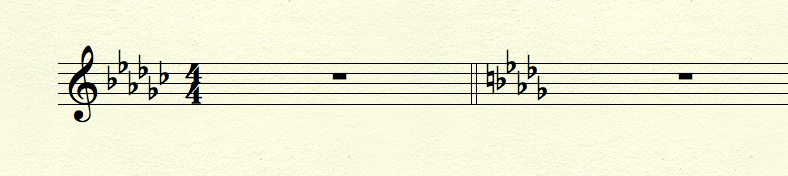
OLD KEY is Gb major - 6 flats; NEW KEY is Bb minor - 5 flats. Option 1 above would have 6 naturals followed by 5 flats which is a mess and redundant; option two above would only show 5 flats, leaving it to chance the reader would pick up that the C is no longer flat. WHAT I WANT (and we need) is the ability to change the key by showing on the initial key change the 5 flats of the new key AND a C-natural as part of that one key signature. If you are changing from the key of E to the key of A, the new key signature would show 4 symbols - three sharps and a D natural.
Is there a way we can do this in Finale? If not, can we please add it to the wish list?





10 comments
Date Votes