New post
Avatar
-4

(Finale 25 on Windows 10 - totally useless to this question)

When we change key signatures in Finale, it seems we have only two options, selectable in the Document>DocumentOptions>KeySignature dialog:

1. We can either cancel out the entire key signature (a batch of naturals) then assign the new one, or

2. We can simply have the new key signature without any cancellations.

Option one is a mess and would be confusing at first glance to most music readers.

Option two leaves it to chance that the music reader would pick up on the difference between the previous and new keys.

WHAT WE NEED is the option to have key cancellation only for the difference. Here's a good example:

OLD KEY is Gb major - 6 flats; NEW KEY is Bb minor - 5 flats. Option 1 above would have 6 naturals followed by 5 flats which is a mess and redundant; option two above would only show 5 flats, leaving it to chance the reader would pick up that the C is no longer flat. WHAT I WANT (and we need) is the ability to change the key by showing on the initial key change the 5 flats of the new key AND a C-natural as part of that one key signature.  If you are changing from the key of E to the key of A, the new key signature would show 4 symbols - three sharps and a D natural.

Is there a way we can do this in Finale? If not, can we please add it to the wish list?

10 comments

Date Votes
Avatar
0

Sorry, but we don't need that. Musicians know what the key signature change means. I fear that your way will confuse many, many people.

Comment actions Permalink
Avatar
0

This is all that's needed. Finale does this already, just don't mix major and minor key signatures. What I used here was Gb major going to Db major. It works fine.

Comment actions Permalink
Avatar
0

>Option one is a mess and would be confusing at first glance to most music readers.<


Nope.


>Sorry, but we don't need that. Musicians know what the key signature change means. I fear that your way will confuse many, many people....<


Yep


>This is all that's needed. Finale does this already, just don't mix major and minor key signatures. What I used here was Gb major going to Db major. It works fine.<


Has Finale ever not done this?

Comment actions Permalink
Avatar
0

… Is there a way we can do this in Finale? …


Yes, it can be done in Finale. You can have any accidentals, in any order.


Comment actions Permalink
Avatar
0

@PeterThomsen THANKS that was exactly what I was looking for - now can you offer pointers on just HOW to do that? Is there a page with instructions?

Comment actions Permalink
Avatar
0

Look for the thread “Accidentals don’t playback when using non-standard key signature”

(For some reason, I am unable to paste the link.)


It’s not for the faint of heart. And it’s still a bad idea, to use it in the way you describe.

Comment actions Permalink
Avatar
0

… @PeterThomsen THANKS that was exactly what I was looking for - now can you offer pointers on just HOW to do that? …


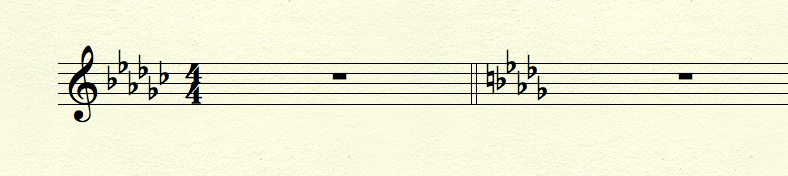
The two key signatures in my attached graphic are “basically” the same key signature, namely a Linear Key Signature with four “sharps”.

The only difference between the two key signatures is that the second key signature as its fourth “sharp” (= Unit 4) displays a natural instead of a sharp.

Hence you can not have these two key signatures in the same Linear Key Format.

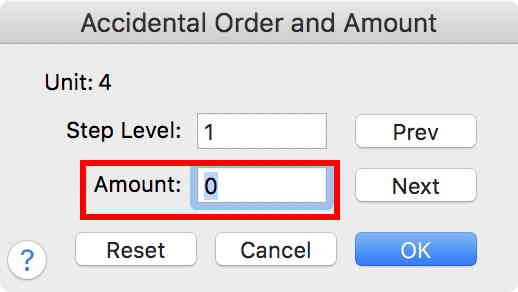
You must create a new Linear Key Format for the second key signature.

Then, set the Amount for Unit 4 to zero:


Comment actions Permalink
Avatar
0

I'm out of my element when it comes to custom key signatures, Peter is the expert. But I'm wondering the solution that Peter has posted has the natural as oart of the key signature. Does that mean it appears that way on all systems, with the natural, or just once as a cancellation?

Comment actions Permalink
Avatar
0

… I'm wondering the solution that Peter has posted has the natural as part of the key signature. Does that mean it appears that way on all systems, with the natural, or just once as a cancellation? …


It appears that way on all systems, with the natural.

If you only need it once, as a cancellation, then in the next measure, change the key signature back to “normal”, without the natural.

Use the Measure Tool to hide the key signature change.

Comment actions Permalink
Avatar
0

Thanks Peter, good to know.

Comment actions Permalink

Please sign in to leave a comment.