

I love when Finale support sends an email that cites, "we're here to help you." Then they tell you that they can't spend time clarifying their random, fucked-up, disorganized instruction manual, that they can only work on bugs and broken software.
So, I've spent the better part of two weeks trying to extract this information from support to no avail. They really have a problem with swing/shuffle 16th notes. It's a huge PITA to get it to playback, but there's a workaround, blah, blah, blah. I get it.
Now, I just want to be able to communicate to the player of the part I'm creating that we're using a funk shuffle. I'd like to use the standard "two 16th notes = 8th note/16th note triplet. Expression #23 is the graphic I'd like to pattern this after: 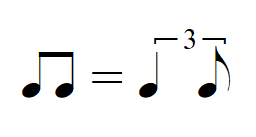
However, I'd like it to reflect two 16th notes equalling an 8th note and a 16th note under a triplet. The closest I could get was this:
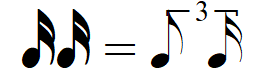
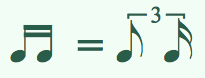
It's a little screwed up. The two 16th notes would be better beamed, the triplet bracket a little higher, etc. No way to edit this. I thought Finale was the industry standard. Not very user friendly, is it? Support is useless, manual sucks, what's a musician to do?



3 comments
Date Votes