New post
Avatar
0

I used to use Finale Print Music made in 2007, and sometimes the full Finale. My computer crashed and I had to replace the computer with a new operating system and then download the newest Finale. Apparently, I am now unable to do any of the old things on the new Finale.

Example: I’m scoring a piece for piano, trumpet, guitar, and drums. The problem I’m having is with the playback. At first, I got no sound at all. After spending quite a bit of time and jumping through a lot of different hoops, I finally got the piano to sound like a piano. No such luck with the trumpet or the guitar. And the drums: no sound at all.

Am I missing something very basic? Why has this software changed so dramatically in 13 years?

35 comments

Date Votes
Avatar
1

Welcome to the forum!


In order to help you we need more info:


1) Windows or Mac? - and what version of the operating system?


2) The steps needed to replicate the problem.

In Other Words:

- What are you trying to achieve?

- How are you trying to do it?

- What happens when you do that?

- What doesn’t happen that you expect to happen?

Comment actions Permalink
Avatar
0

My computer is a Mac.


I have a 2012 Mac mini, running OS 10.14.6.


Finale is version 26.2.2.494.


I am trying to get Finale to do the same thing it did with the version from 2007: to play back the sounds of the instruments I have selected. I am trying to do it by executing the playback, the same way I did with the 2007 version.


With my old computer, and the 2007 Finale, I could enter the notes onto the staff and they would make a sound just like the instrument(s) I chose, eg., trumpet. Now, with the current version, I either get no sound or the wrong sound. There is no sound when I enter the notes on the staff, and there is no sound when I do the playback. Or, if there is a sound, it is the wrong sound (eg., does not sound like trumpet).


To be fair, I am able to get the piano to sound like a piano, but not without a lot of effort from trying different settings. None of my efforts to get the trumpet, guitar, or drums to sound right have been successful.


Comment actions Permalink
Avatar
0

Ernie Centofanti,


We need to know what playback technology you are using (= computer generated sounds or sampled sounds).


Take a look in the MID/Audio menu.

At the top of the MID/Audio menu the playback technology options are:

Play Finale Through Audio Units

Play Finale Through MIDI


Which option are you using?

Comment actions Permalink
Avatar
0

I am using the “Play Finale Through Audio Units” option. When I do, the piano part is sounding OK. The trumpet, guitar, and drums make no sound at all. 


I did try “Play Finale Through Midi” to see what that would do, and I got no sound on anything at all.

Comment actions Permalink
Avatar
0

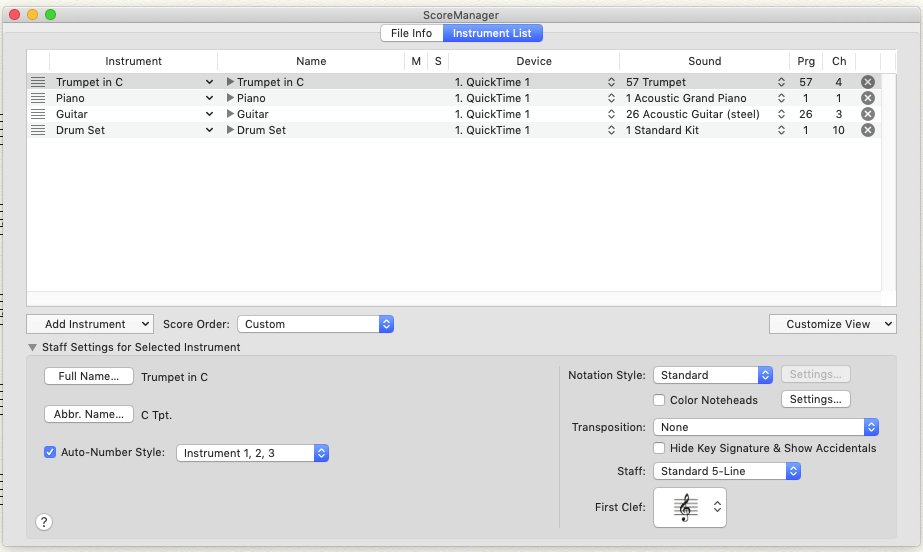
What are the settings in the Score Manager? 

Comment actions Permalink
Avatar
0

Under instrument list, I have the following options, and here are the results I get with each:


None = no sound

AU Sampler = sound, but wrong (all instruments sound like a synthesizer)

AUMidiSynth = sound, but again wrong

DLSMusicDevice = This one gets the piano to sound correct, but

the trumpet, guitar, and drums all sound like piano

SmartMusicSoftSynth = no sound at all

Comment actions Permalink
Avatar
0

… I did try “Play Finale Through Midi” to see what that would do, and I got no sound on anything at all …


… I am using the “Play Finale Through Audio Units” option …


… SmartMusicSoftSynth = no sound at all …


The SmartMusic SoftSynth is for “Play Finale Through MIDI”.

Try the following:

MIDI/Audio menu > Play Finale Through MIDI

ScoreManager > Instrument List > SmartMusic SoftSynth

MIDI/Audio menu > Reassign Playback Sounds


Let us know what happens.

Comment actions Permalink
Avatar
0

When I do the following:

MIDI/Audio menu > Play Finale Through MIDI

My previous choices for “Device” disappear and I am no longer able to select SmartMusic Soft Synth. Instead, my 8 choices are Quicktime 1, Quicktime2, … Quicktime 8. I tried all 8, and no sound.

I also tried selecting SmartMusic Soft Synth first, before doing the “MIDI/Audio menu > Play Finale Through MIDI”. The result is no sound at all.

Comment actions Permalink
Avatar
0

… Instead, my 8 choices are Quicktime 1, Quicktime2, … Quicktime 8 …


Finale playback with Quicktime!

That brings back some old memories.

It sounds like you are working on a document created in a (much) earlier Finale version.


Instead, try a fresh, new document.

When I do so (= fresh, new document), I get SmartMusic SoftSynth in the Device column.

Comment actions Permalink
Avatar
0

But I am working on a fresh, new document. I just created the document a couple of days ago! It is NOT an old document. And I am using the latest version of Finale! On a brand new document! 

Comment actions Permalink
Avatar
0

… On a brand new document! …


And how are you getting that “brand new document”?

Perhaps via

File menu > New > Document Without Libraries

?


Please specify your steps so that we can try to reproduce the problem.

Comment actions Permalink
Avatar
0

Can you post a screen shot of your Score Manager for one of the pieces giving you difficulty?

Comment actions Permalink
Avatar
0

I am using Document Setup Wizard.

Then I do: Create New Ensemble—>Engraved Style

Keyboards—>Piano—>Add

Brass—>Trumpet in C—>Add

Plucked Strings—>Guitar—>Add

Drums—>Drum Set—>Add


I put in the Title Info

I select the key sig, time sig, tempo

Comment actions Permalink
Avatar
0

Here is a screen shot:

Comment actions Permalink
Avatar
0

Ernie Centofanti,


When I do the same as you, I get SmartMusic SoftSynth - and no Quicktime.


Just a thought:

When you installed Finale, did you run only the Finale program installer?

Comment actions Permalink
Avatar
0

I’m not sure, but I think I ran only the installer. Also of note, I am currently using the Demo Version, if that makes a difference. Maybe the Demo version does not provide full functionality?

Comment actions Permalink
Avatar
0

The demo version gives you full function, except for the Garritan sounds. I know the standard install gives you SoftSynth, because that's all I've ever done.


Try it with the Default Document. No Wizard, no nothing.

Comment actions Permalink
Avatar
0

Indeed the Demo is the culprit.

With a “Full Install” you get a lot of playback sounds that are not included in the Demo.


Beware, though, that a download of the “full Finale Install” is a BIG download (much bigger than the Demo).

Comment actions Permalink
Avatar
0

From a Screen Shot:


Comment actions Permalink
Avatar
0

I just noticed another problem. Three weeks ago I created a piano/vocal piece with the Demo version. I was able to play it with sound. Now the sound doesn’t work on it any more.

“Everything is included except the premium Garritan sounds.” —Does that mean I get no sound at all? Or a lower-grade sound?

“Try it with the Default Document. No Wizard. No Nothing.”— OK, I tried that. I get no sound at all.


Comment actions Permalink
Avatar
0

You get the MIDI sounds, which are fine for general use.


Does your default doc still show only the QuickTime in the Score Manager? If it now shows SoftSynth, make sure you have Playback thru MIDI selected.


Can you send me that original doc? Send it to wawoodman at aol dot com.

Comment actions Permalink
Avatar
0

“Does your default doc still show only the QuickTime in the Score Manager? If it now shows SoftSynth, make sure you have Playback thru MIDI selected.”


It shows SmartMusic SoftSynth ONLY when I have “Play Finale through Audio Units” selected. When I select “Play Finale Through Midi,” my only choices are Quicktime 1 through 8. I will email the doc to the address you provided.

Comment actions Permalink
Avatar
0

Then use the SoftSynth; they give you Finale's MIDI sounds.


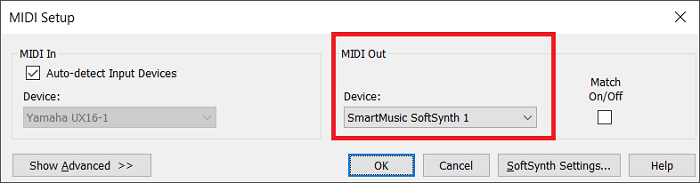
Incidentally, what does your MIDI Setup screen look like?


Comment actions Permalink
Avatar
0

That might be it, Adrian. He sent me the score, and it played fine. I thought it might be in the MIDI thru, but you might have hit it.

Comment actions Permalink
Avatar
0


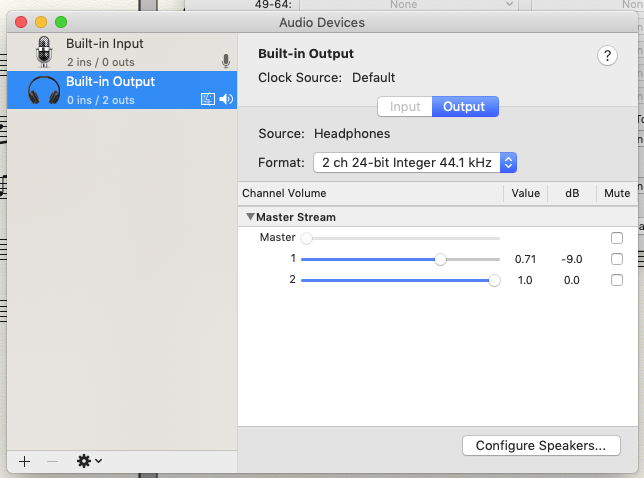
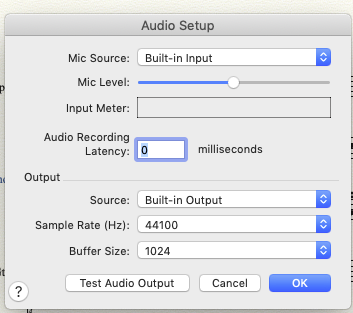
Here are two screens that I have. I don’t have anything that looks like your sample.


Comment actions Permalink
Avatar
0

Adrian, where on earth do I find that screen that you posted? What menu generates that?

Comment actions Permalink
Avatar
0

… Adrian, where on earth do I find that screen that you posted? …


Adrian’s screen shot is from Windows Finale.


Mac Finale has a MIDI Setup dialog box that looks different from the Windows Finale dialog box:

MIDI/Audio > Device Setup > MIDI/Internal Speaker Setup.

Comment actions Permalink
Avatar
0

Here it is how it looks like in the current Finale Mac version :


Comment actions Permalink
Avatar
0

Yes, Michel Herr. That is what I have. But what should my settings be?

Comment actions Permalink
Avatar
0

… what should my settings be? …


Your settings should be as shown in the screen shot.

Comment actions Permalink

Please sign in to leave a comment.