New post
Avatar
0

Dear all,


Is there anyone who had the experience with play back the given metronome numbers from the expression tool?

for example : I have given Allegro vivo , dotted quarter note  = 146.  It plays only tempo 40. 

What could be the solution?

Thanks for the feedback.   

Bert

15 comments

Date Votes
Avatar
0
Comment actions Permalink
Avatar
0

If I understand you correctly, you are controlling the playback tempo via an expression (not using the Playback Controls window) - right?

And the expression is defined for Playback Tempo (not just displaying the tempo, but also defined for Playback Tempo) - right?


Three things control the tempo in Finale:

- MIDI Tool (= the recorded tempo changes)
- Expression Tool (= the expression tempo changes)
- Playback Controls

And they work in a hierarchical fashion.

The tempo in the Playback Controls is overridden by an Expression that sets a tempo.
This is overridden by the MIDI Tool, which is at the top of the “Tempo Hierarchy”.


Since your tempo expression is overridden, I would delete the Tempo Changes in the MIDI Data:

Selection Tool.

Select All.

Edit menu > Clear Selected Items…

In the dialog box Clear Selected Items, de-select everything, then select only Tempo Changes.

Comment actions Permalink
Avatar
0

Dear Peter,


Thanks! I have tried, and took all the steps but then the whole score is gone and nothing comas back.

What did I forget?


Best, Bert


Comment actions Permalink
Avatar
1

Bert,


PLEASE look at the House Rules. We need to know what platform and version, what Finale version, what you have tried, and answer my question about how you are starting playback.


We need to know as much as we can, so we aren't just guessing or giving bad answers.

Comment actions Permalink
Avatar
0

Dear Mike,

Apologize , I thought I have logged in in finale support.

I work with version 27, windows 10.

The playback I use is: Midi/audio and then the button: start playback

From the expression selection tool I have used Allegro vivo with tempo dotted quarternote = 146 .  

I have tried under to change with new  tempo characters but the result is still the same. 

Thanks for you help.


Bert 


Comment actions Permalink
Avatar
0

… I have tried, and took all the steps but then the whole score is gone and nothing comes back.

What did I forget? …


What you forgot, was perhaps this step:

“In the dialog box Clear Selected Items, de-select everything, then select only Tempo Changes.”

Comment actions Permalink
Avatar
0

Dear Peter,. When I deselect everything, the whole score gets empty and nothing comes back.

Comment actions Permalink
Avatar
0

That is definitely not normal behaviour.


That the whole score “gets empty”, is what is supposed to happen, if you select everything in Clear Selected Items.


1) Are you sure the whole score is empty? - it is not just a display problem? - What happens if you Redraw Screen?

2) Is the problem document specific? - Does the same “disappearance” happen in other Finale documents?

Comment actions Permalink
Avatar
0

Now it is ok with the deselection of everything. The document is still here , I have selected only tempo changes , but nothing different has happened.

Comment actions Permalink
Avatar
0

If clearing Tempo Changes does not help, then I suspect that the tempo expression is not defined for playback.


Expression Tool. Handles appear on all expressions.

Drag-select the handle on the tempo expression (= Allegro vivo , dotted quarter note  = 146).

With the handle selected, hit the Return key. The Expression Selection appears, with the tempo expression selected.

Click the button {Edit…}. You get to the Expression Designer.

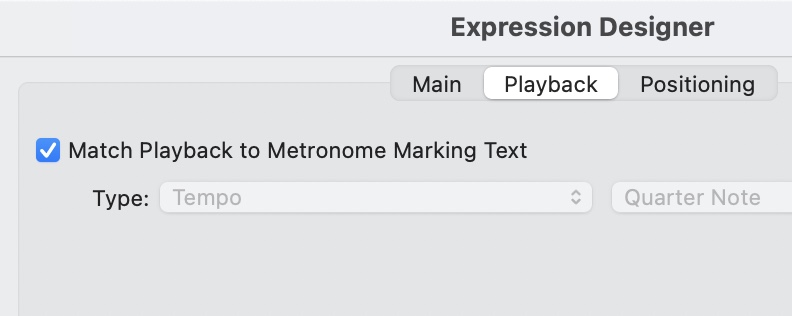
Click the chiclet Playback. - Is the expression defined for playback tempo?

Comment actions Permalink
Avatar
0

Bert,

Did you create the tempo marking yourself?

This is what Peter is referring to:


Comment actions Permalink
Avatar
0


Thanks Mark, Peter

The expression is defined for the playback tempo. Several times tried different tempos as well, but nothing happened till now.

I have created the marking myself 


Comment actions Permalink
Avatar
0

Bert Langeler,


As a test (not as a solution), have you tried one of the default Tempo Mark expressions in the Expression Selection?

- Do the default Tempo Mark expressions work (= give the playback tempo displayed in the Metronome Marking Text)?

If you can find a Metronome Marking that works, try editing a duplicate copy of that very expression, and change the Metronome Marking Text.

Comment actions Permalink
Avatar
0

Dear Peter,


I have tried your ideas, with default tempo marks as well in all different ways. I checked the whole expression box, but there is no change. Everything it plays in a very slow adagio.  I tried as well different files, but all are the same.

Also tried to make an audio file and midi file. They play back in a more average tempo, but not the indicated tempo.


Comment actions Permalink
Avatar
0

If you get a different playback between real-time playback and an audio export, you should probably send a copy of your file to Finale Support using the "Submit a request" link at the top of this page.

Comment actions Permalink

Please sign in to leave a comment.