New post
Avatar
0

I’ve been a Finale user for over 20 years, yet new issues continue to arise, such as enlarging measure numbers when using tabloid size paper. I need to provide the conductor, and eventually a publisher, a camera-ready score. Though my deadline is upon me, yesterday I spent over an hour searching for the solution, including the users forum, to no avail. Finale is a complex program. I have spent plenty on your products, but would gladly pay a little more to restore the former level of technical support your company used to provide. if that’s not possible, and your customers are left to fend for their themselves, I respectfully ask that you at least provide us a more comprehensive index of issues and directions on how to resolve them on our own. This is one of two reasons that I recommend my students use Sibelius, which they usually find to be a more intuitive program.

11 comments

Date Votes
Avatar
0

You don't say which Finale version or what platform you are using, but as far as I know, controlling (including enlarging) measure numbers has been a feature for as long as I have used Finale (some 30 years), and doesn't have anything to do with paper size. You might have to experiment some to find the right size to go with your paper, but it's easy to do:

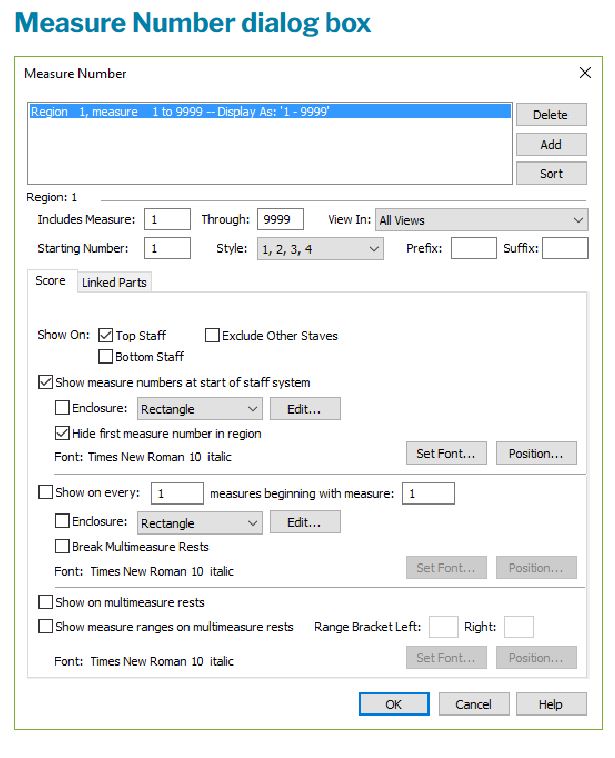
Measure Tool > Edit Measure Number Region > in the Measure Number window you can edit fonts, type, size (fixed or relative), placement, enclosures, etc. for both score and parts.

Comment actions Permalink
Avatar
1

If ‘twere me, and I was determined to move away from Finale, I would probably recommend Dorico, rather than Sibelius. 

Comment actions Permalink
Avatar
0

So, Mike, the idea of permanent subscription for features that never keep up doesn’t appeal to you?


Me neither. I own licenses for most notation apps except Sibelius — never liked the workflow. Perhaps Dorico 4 may finally fulfill the promise — we’ll see… Looking forward to Finale 27.

Comment actions Permalink
Avatar
0

Mike, I hadn’t even considered that aspect. I just think that, unless something major was to occur in the ownership “vision” of both Finale and Sibelius, that Dorico may well be the product of the future. 

There is absolutely no reason for me to consider a change at this stage of my life. But if my Wayback machine were fully functional, who knows? (Yes, I know Dorico wasn’t around 30 years ago, but allow me some literary license, here!)

Comment actions Permalink
Avatar
0

I do not blame Finale for not being Dorico (for a variety of reasons), and I do not blame Finale for not pre-announcing details for upcoming updates; but I think it would be very valuable to understand their value-proposition (I think that is the word), where they think Finale fits into the notation (and playback) scene going forward.


If one reads enough of Dorico's material one can start to see how their development team sees its program concept: separating input and editing, formatting primarily by rules and master pages rather than individual adjustments, automating as much as possible to favor Elaine Gould's notation schema. I'm not saying that Dorico is there yet or that there are not drawbacks to this approach, but they are clear about their vision of their product. It is confusing to (sometimes) see announced or realized features in Finale and ask oneself, "But why this? Where is this headed long-term?"

Comment actions Permalink
Avatar
0

I agree with you said above. This is one of the reasons why I bought Dorico Pro last year. The uncertain future of Finale got me worried. I really hope Finale 27 changes that feeling. Certain things like automatic position of music elements in the score should have being implemented already in the program. For example, why I have to adjust manually first and second ending every time I put chord symbols in the measures - this should be an automatic (magnetic) layout - it is a time consuming task. We need a better and modern workflow for certain tasks.


Finale 26 - Dorico Pro 3.5 - Mac OS Mojave 10.14.6

Comment actions Permalink
Avatar
0

I hope you managed to find a solution to your measure number problem, Martin.  Nothing on the dropdown menu seems to work for me once the initial attempt has brought in those huge bar numbers obscuring the top line of the staff, never to be got rid of again.  Having paid such a huge amount I really want to put a whole baroque sonata on one document, which means returning to bar one for each new movement (having struggled through working round the totally inappropriate prescriptive tempi).  One would think adding number regions would be the answer?  That seems the intuitive way to go surely, but apparently not.

Comment actions Permalink
Avatar
0

Margaret Johnson,


It seems to me that you are describing two different problems with Measure Numbers.


1) Getting rid of “huge bar numbers obscuring the top line of the staff”.

From your description it sounds like you need to remove the Measure Numbers, not keep them and make them smaller - right?

I suppose that you have already, in the Staff Attributes, de-selected the display of Measure Numbers - right?

The next step is to edit the Measure Number Region (Document menu > Edit Measure Number Regions…), and de-select the “Show On:” option “Top Staff”.


2) Multiple movements in the same Finale document, each movement with a Measure Number Region beginning the numbering from 1.

Using multiple Measure Number Regions seems to work for me.

Make sure that you in each and every Measure Number Region specify what measures should be included in the Measure Number Region.

If you still can not make it work, give us a precise description of your steps, so that we can try to reproduce the problem.

Comment actions Permalink
Avatar
0

Thanks Peter.  I've managed to solve my current issues.  I'm afraid I wasn't spotting the "position" option in the dialogue box, which is in plain sight, I must admit! 

And I am now aware that despite the box stating that the font used for measure numbers is Times New Roman, you have to deselect Maestro each and every time you undertake a separate action.

A search through old posts gave me the nifty solution to number regions not starting from 1 each time, by selecting "ABC" each time then going back to "123".  Though it would be rather nice if a nifty trick was not necessary.....


Comment actions Permalink
Avatar
0

… A search through old posts gave me the nifty solution to number regions not starting from 1 each time, by selecting "ABC" each time then going back to "123".  Though it would be rather nice if a nifty trick was not necessary …


I am afraid I do not understand.

For what problem do you need that “nifty” solution?

Are you talking about multiple movements in the same Finale document? - or something else?

I suspect that what you need, can easily be done, without laborious workarounds.

But I need to understand what layout is needed.

Comment actions Permalink
Avatar
0

Honestly, it still amazes me that I have to play with entering numbers and using trial and error to fix where Finale thinks dynamics should go, why more things are not easier to do in Finale, why so much of the UX harks back to the 90’s. 

Comment actions Permalink

Please sign in to leave a comment.