New post
Avatar
0

Maybe your people could fix Finale 26, which I purchased two weeks before the launch of 27 but that is another story, so it works with the new mac M1 and Big Sur without all of the stupid bugs.  It is absolutely fantastic to have to close and reopen a file 20 times working on a project.  Plus, if your high-dollar software cant freaking do screen redraws can you at least put the manual redraw screen button back in!


Back to the Finale 27 issue.  You might let people know that you are two weeks away from launching a new version before they spend money on a version you won't support.  Great marketing strategy.

Ass hats 


Very satisfied customer


18 comments

Date Votes
Avatar
1

Feel better, now?

Generally, there is a grace period for people who make a purchase shortly before a new version comes out. Did you ask?


Screen redraw still works for me in 26, with the (Mac) shortcut CMD-D. 


I do agree that there are a number of faults in F27, which feels to me like a rushed release.

Comment actions Permalink
Avatar
0

Have you contacted MakeMusic/Finale directly to see if they will automatically upgrade your Finale 26 to v27 if you did purchase 26 just two weeks before the 27 release? The "Submit a request" link above should let you contact Sales Support to ask your question if you have not already.


Ah, just got ninja'd by Mike! :-)

Comment actions Permalink
Avatar
0

Does 27 actually work on Mac M1 with Big Sur without all of the bugs?

Comment actions Permalink
Avatar
1
Comment actions Permalink
Avatar
0

Are you using a mac with the M1 chip?  I think that is what causes the issues.  

Comment actions Permalink
Avatar
0

I don’t think so. Mine is about 3 years old, so I suspect it’s the old Intel(?) chipset.

Comment actions Permalink
Avatar
0

Firstly, I think you need to clarify exactly which bugs you're talking about. I don't think anyone else has mentioned having to open and close a document 20 times, so it may be a specific problem to your setup (which can therefore be fixed by you). 


MakeMusic's compatibility statement says that 26.3 should work on Big Sur with only a few "minor cosmetic issues". 

They do not recommend using Finale on Apple Silicon (M1) Macs. (However, most anecdotal reports suggest that it runs fine.)
https://www.finalemusic.com/blog/finale-v26-compatibility-with-macos-big-sur/


In fairness, MM did post several blog post for over a month, heralding the release of F27.

Comment actions Permalink
Avatar
1

Midi/Playback Error 7 message constantly.  Can only clear by save/quit/restart app. Happens 100% of the time when the computer goes to sleep.


Issues w/screen redraw especially using paste from file to file.  Had to completely redo a file twice (recreate a totally new file) due to a visually blank page after an issue with a paste from another open file.  These are files I made on Finale 25 and 26 on an older mac air and a new file created specifically from this computer.  


Can't select target measure for playback.  Have to listen from the beginning.  This is intermittent and can't figure out what seems to hang it up. save/quit/restart computer seems to clear it for a short time but it does comeback.  


Export Audio MP3 sometimes exports a file that is not open, incorrect audio, or it labels the audio file, which is the correct audio, another file name.  The only good news is this thing is so damn fast creating another MP3 file is almost instantaneous.  


Intermittent Accent tool and expression tool issues.  They won't work. Have to save/quit/restart the application and occasionally restart the computer.  


These are the primary issues I have encountered.  Lots of save/quit/restart app or computer which is a huge time waste. 

Comment actions Permalink
Avatar
0

Have you sent these in to tech support? Please keep in mind that this is a user forum.

Comment actions Permalink
Avatar
0

YUP

Comment actions Permalink
Avatar
0

>> Are you using a mac with the M1 chip? I think that is what causes the issues.  


I suspect that if that alone was the issue, we'd have more people reporting it here. Are you playing Finale through Rosetta 2?

Comment actions Permalink
Avatar
0

>Midi/Playback Error 7 message constantly.<


7 and -7 are generic OS messages with many possible causes. If you have not shut down completely and rebooted, that’s the first step.

Comment actions Permalink
Avatar
1

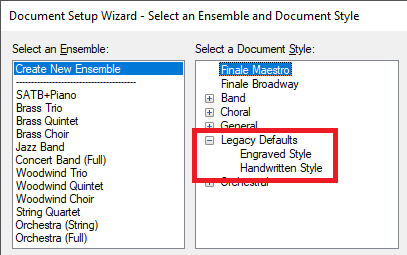
SMuFL will never be backward compatible. That is why Finale 27 gives everyone the option to start a file in the Legacy Finale format. All one has to do is select it when one opens a new file.


Comment actions Permalink
Avatar
1

>Basically what it means is that Finale is no longer backward compatible any longer.<


"Basically", that is most definitely not the situation. I can open legacy files and save in legacy formats and that is backwards compatibility. 


27 offers SMuFL support, a new feature that does not compromise backwards compatibility, your continuing attempts to redefine things to the contrary.

Comment actions Permalink
Avatar
0

Except for the ability to revert to Finale 2012 format, Finale has never been backward compatible with former versions. (The closest they came was with Finale 25-26 which would lose any v26 changes if opened in v25.) If you cannot move from machine to machine in Finale 27, don't attempt to use SMuFL or get used to messing with XML clean-up.


The Finale Development Team has some work to do to bring v27 up to snuff, but making it backward-compatible is likely not on their agenda and probably should not be.

Comment actions Permalink
Avatar
0

>Except for the ability to revert to Finale 2012 format,…<


A feature unchanged in the last few versions going back to 2014. I probably should have been more clear. Then there's this:


MusicXML 3.1 isn't perfect but the Dolet plugin enables Finale back to 20011 to open files exported in that format.

https://www.musicxml.com/dolet-plugin/dolet-plugin-for-finale/ 


I don't see the Dolet 6 plugin anymore except for Sibelius. It adds MusicXML 3.0 to Finale going back to 2009 if memory serves me correctly.


Comment actions Permalink
Avatar
0

Mike,


It appears that a message has disappeared (or been heavily edited) since I wrote my last post, which was not responding directly to you but to the (disappeared?) post from which you quoted the  

>Basically what it means is that Finale is no longer backward compatible any longer.<

phrase.


No criticism of anything you said was intended.

Comment actions Permalink
Avatar
0

I have removed most of my posts as I felt that they were not helpful to anyone and I wasn't getting any closer to fixing any of my issues. Instead I have made contact with a very helpful Finale tech and I will sort these out via this method. I appreciate any replies to my posts here as some, in particular those form Mike Rosen have helped to sort some of the issues I was having. My gut feeling is that there are issues that only the developers at Finale can fix and so I will give them detail feedback on my issues and take it from there. If I get any advice or updates on fixes I will let you all know of course.

Best wishes and cheers! Andy

Comment actions Permalink

Please sign in to leave a comment.