New post
Avatar
0

The default, for some reason, seems to be that a repeat sign is ignored after it is executed once. I am seeking a seamless, simple way to get the repeat sign to do what it's supposed to do in some cases, that is, execute it no matter how many times it is encountered. 

For instance, let's say I have a piece which is A B C, played twice. And let's say the B section has repeat signs as well. 

finale will play ABBCABC, ignoring the repeat for section B. How do I get it to honor that repeat every time?

4 comments

Date Votes
Avatar
0
Comment actions Permalink
Avatar
0

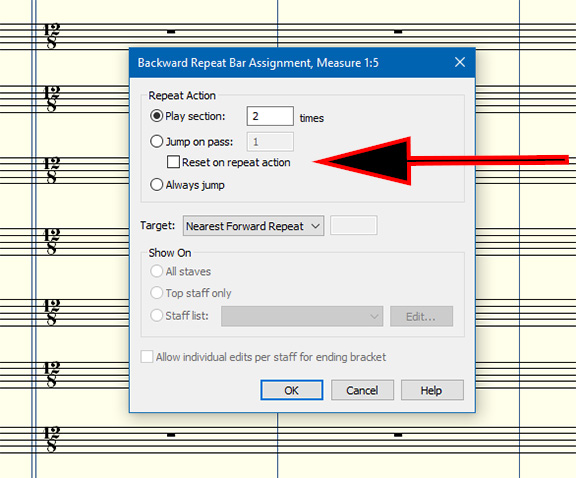
Repeats and DC can be tricky to setup to have correct playback. But it is impossible to know yours without seeing the exact document  and exactly what you want. I suspect you have set something wrong or missed something in this box.


  • Reset on Repeat Action. Once Finale has played the music the number of times specified in the Play Section __ Times or Jump on Pass(es) text boxes—and thus performed the Repeat Action—it will, if you wish, reset its internal "counter" back to zero and begin counting toward the Total Passes number again. This option could be useful if you’re creating nested repeats, and want an inner repeat to be fully executed with each pass of the larger repeated region.
Comment actions Permalink
Avatar
0

I’m still waiting for a “reverse check return” tool. Let us put in the road map (1-20, 6-19, 21-71, etc.) and have Finale enter the correct repeat signs and settings. 

Comment actions Permalink
Avatar
0

Nested repeats can be a source of problems. Maybe reserve the repeat for B and use D.S. or D.C, placed at the end of C to play A B C.

For a simple repeat, you will have to check the box "Reset on Repeat action (see image above).

Things are different if there are 1st/2nd repeats. Is it the case ?

Comment actions Permalink

Please sign in to leave a comment.