New post
Avatar
0

I'm having a problem with typing in a half-diminished 7 sign.  Basically, if you type Shift-5 you will get the symbol just fine, but, if you type Shift-5 7 to create half-diminished 7, it will say that Finale can not find half-dim. 7 suffix.  So, I create the suffix, then - the next time I type in Shift-5 7 it says it can't find the suffix - but it's there!  

I'm wondering why this suffix isn't just "there"?  I have NEVER seen just the lone sign.  I would argue that there just isn't really that sign unless there's an added 7th.  

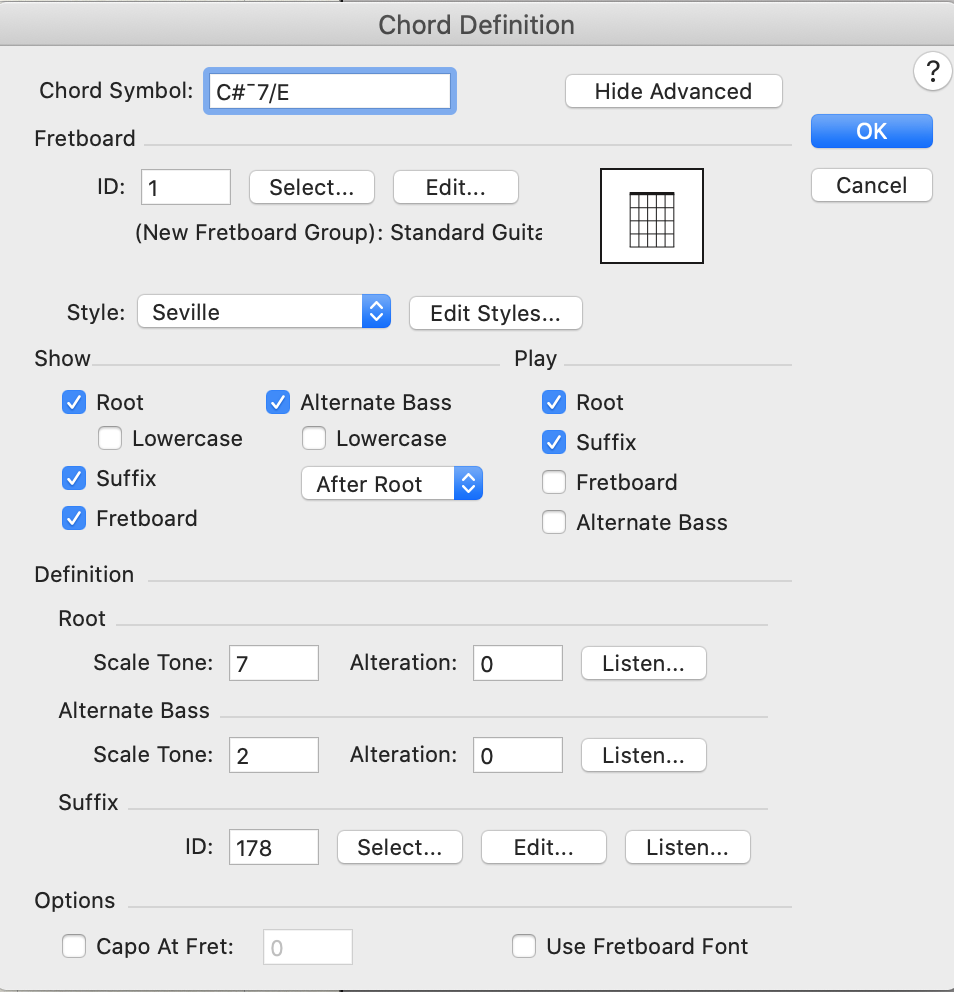
Lastly, after creating the symbol, when I look at the chord definition box there's a dash where the % symbol was.  The dash is on the top part of the screen, and I can't figure out what key stroke it is!

I'd love to hear people's insights into any of this!


John

Mac Catalina Finale 26
23 comments

Date Votes
Avatar
0

What font are you using for the chord suffixes?

By looking at your attached screen shot I can not see what is the chord suffix font.

Comment actions Permalink
Avatar
0

It's Times New Roman - one of the fonts Finale recognizes. If I type Shift-5 I get the half-diminished symbol just fine. A lone half-diminished symbol is in the library.  It's just that there is no half-diminished 7 symbol in the library.  I've never seen a lone half-diminished sign without the added 7, so, I can't understand why it isn't already in the library.  I'll type "shift-5 7" in and will get the correct symbol with the added 7 - but, I'll have to add it to the library.  Plus, the symbol is too low, so, I have to go into the tool and raise it, which is a pain.  The problem is that Finale doesn't seem to recognize that symbol when I type it again.  It says that the suffix is not in the library - even though it is.  That's why I attached the picture of the chord definition.  In the chord definition box there's this C-7 (with the minus up high) rather than C%7, which is what I typed.  

First, I think the MakeMusic people should add half-diminished 7 - and you should be able to get it by typing %7 (and the symbol should correctly be in about the same place the diminished sign appears).

Second, I would like to know what that raised minus sign is, so I can just type it in.

Thanks!  John

Comment actions Permalink
Avatar
0


I see a half-diminished chord = Cm7(b5) = as composed by definition of 4 notes (1, m3, b5, b7). If only three notes are used (1, m3, b5), it is not a half-diminished chord, but a diminished chord.

About the ¯  symbol : I couldn't find a keyboard shortcut for it, but I find it (and can copy it from) PopChar (in Times, for instance).

I use Keyboard Maestro and I have defined a shortcut to get that symbol in Finale.

P.S. : also commonly used for half dim is the suffix  Ø  (again : 1, m3, b5, b7).


Comment actions Permalink
Avatar
0

… Basically, if you type Shift-5 you will get the symbol just fine, but, if you type Shift-5 7 to create half-diminished 7, it will say that Finale can not find half-dim. 7 suffix …


John Moody,


I am not sure about what symbol you use for half-diminished.

A common symbol for half-diminished is the ø symbol.

But if I understand you correctly, you instead prefer the per cent symbol: %

- right?


I have never seen the per cent symbol used for half-diminished, but I am sure there are many chord symbol characters I have never seen.


Take a look in the Chord menu.

Is the option

Substitute Symbols

selected or de-selected?

If it is selected, de-select it, and try (again) typing the chord suffix %7.


When {Substitute Symbols} is selected, Finale will replace the letter o character with the small circle that means diminished, and it will replace the % symbol with the “other” symbol for half-diminished (which you, obviously, do not use): ø


Hence I suspect that you do not need to have {Substitute Symbols} selected.


If you must have {Substitute Symbols} selected, then you can still enter your %7 symbol, by using the colon method instead:

In this example let us say that - in the Chord Suffix Selection - your %7 suffix is suffix #178.

To type e. g. F#%7, enter F#:178

Tip:

Try typing F#:0 - and hit Return

You get to the Chord Suffix Selection.

This is useful when you do not know the suffix number.

Comment actions Permalink
Avatar
0

Did this ever get solved?  I am having the same dilemma...

Comment actions Permalink
Avatar
0

What dilemma? As explained already, the half-dim chord includes a 7th.

Comment actions Permalink
Avatar
0

Correct!  The problem is finding a way to type it in.  Nothing seems to work.  The only way I can get the symbol is to go manually and finding the symbol in a list.  Shift 5 doesn't work, and that's the only thing I can find from Make Music.  

Comment actions Permalink
Avatar
0

Enter a half-diminished chord the way you did (from the Chord Suffix window). Then right-click (or Ctrl-click, mac) on the handle to edit its Chord definition. At the top, you will see which characters were used to generate it.

You can also type C:  followed by the number associated with the half diminished suffix.

Comment actions Permalink
Avatar
0

Thank you.  I think that was in my original post, though.  I don't know what the character is.  It seems to be a large minus sign, or dash - but, I can't find it in any character map.  It sure would be nice to just type it in!

Comment actions Permalink
Avatar
1

I have never seen the character you describe to indicate a half diminished chord and if you use it, I'm afraid you won't be understood.

m7(b5) is often designated with ø , which can be found in many fonts.

Comment actions Permalink
Avatar
0

I'm just trying to enter the normal half-diminished 7.  Here's one of the links to a Finale Manual (old).  It says to use shift 5 in order to get the symbol.  I want the normal diminished circle with a line through it.  Does anybody know how to type it in??  If you can type in the symbol please tell me the keystrokes to get the half-diminished sign.  Thanks!

Comment actions Permalink
Avatar
0

Yes, I know how. But I'm feeling extra snarky today. Please refer to the forum rules: https://makemusic.zendesk.com/hc/en-us/community/posts/215729367-General-Discussion-House-Rules and list your platform and Finale version. That way, we can give you better answers. Best is to add them to your signature. Refer to Peter, Mike Halloran, Michel Herr, and my posts.
 

Also, when dealing with this sort of thing, knowing if you are using engraved or handwritten styles can help.

Comment actions Permalink
Avatar
0

Thanks Mike!


I just tried to add a signature, but couldn't figure out how to do it.  I tried to update my profile, and the only place I can find says I can't update it from there.  I also can't update a picture or anything.

That would be great if you could explain how you type in the CØ7 symbol!


John

Mac OS 10.15.6, Finale 26.3, High School Teacher, Church Musician, Jazz Pianist, Composer

Comment actions Permalink
Avatar
0

Your Profile > Edit Profile > Description

In the engraved, C:89.


Handwritten, C:153

Comment actions Permalink
Avatar
0

That will definitely work.  Thanks!  I forgot about the colon and memorizing the library number.  That will work, and finding the symbol by looking it up in the library manually will work.  I just wonder what the key-stroke is.  BTW, I am using Finale Copyist Text for the suffixes.  

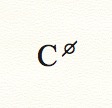
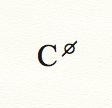
So, I am trying to get this symbol:

The edit window looks like this:

I can't find what "character" that long dash is between the # and the 7.  Just like we can type a "b" and it turns into a flat, and an "o" and it turns into diminished, it seems like we should be able to type in something to get to the half-diminished sign.  For now I will gladly use the "colon+number" option, but I wonder what the actual keystroke is. . .

Also, I'm getting this when I try to edit my profile:

I would love to add a Profile photo, but it says I can't change it from that location.  Where can I change it??  Thanks!


Comment actions Permalink
Avatar
0

You can't. IIRC, I asked tech support to do it.


For that chord, I think there is something wrong in the documentation. Try OPT-hyphen. That works for me, but it may depend on the source of the doc. How are you setting up the document? This is from the Templates > General >Lead Sheet (Handwritten)


Comment actions Permalink
Avatar
1

In fact, the 7 is not necessary, it is implied in the Ø symbol, which stands for a 4 note chord.

P.S. : I use Keyboard Maestro (Mac only) to define keyboard shortcuts. I simply copied the suffix symbol from the the Chord Definition window, pasted into a macro of Keyboard Maestro. Now the suffix is generated by a keyboard shortcut that I have defined.

Comment actions Permalink
Avatar
0

… the 7 is not necessary, it is implied in the Ø symbol, which stands for a 4 note chord …


I agree. And the o symbol, too, stands for a tetrad (o = diminished 7th chord).


However, it seems that to some the Ø symbol stands for a diminished triad.


And to some the o symbol stands for a diminished triad.


If you see the symbol as a triad, then the 7 is necessary, as in ø7, or o7.


Quoting John Moody:

“… I have NEVER seen just the lone sign. I would argue that there just isn't really that sign unless there's an added 7th …”

Comment actions Permalink
Avatar
0

I just entered C SHIFT+5 into the chord cursor of my default Finale file, and the program gave me back the correct half-diminished (seventh) chord (without the superfluous 7) as shown in Mike Rosen's original post.

If you look at the playback panel for this, you will see the diminished fifth and the seventh accounted for (in semitone offsets downward ).


Comment actions Permalink
Avatar
0

It's a pretty standard argument: for everyone who says a chord symbol should be interpreted one way, an equal number say that's wrong. Maybe it depends on the part of the country (world) or where you went to school.


Adrian,

I think that's a Mac/Windows thing. The 7 was a manual entry. The shortcut is just for the symbol.

Comment actions Permalink
Avatar
0

It is a shame that over the years (jazz) chord and drum notation has not become more standardized. Even Dorico's multiple chord options cannot account for every "school" of chord notation out there. :-)


(What specifically is a Mac/Windows thing? I'm always anxious to learn something new.)

Comment actions Permalink
Avatar
0

The shortcut for the ø symbol: I used OPT-hyphen, you used Shift-5.

Comment actions Permalink
Avatar
0

Problem solved!  The OPT-hyphen works great in Finale Copiest Text and Broadway Copiest Text!  The Shift-5 AND OPT-o work with Engraved files (Times font)!


YAY!


I like to add the 7th to half-diminished chords.  I always say, "half-diminished 7".  It looks weird to not actually see the 7th.  Also, I would argue (not very strongly) that there is no such thing as a "half-diminished" without the 7th.  It looks like a triad, and there is no half-diminished triad.  Anyway, it is nice to have the key strokes available!!!!


But, as an addendum to the discussion, I tried to type in OPT o7 to make a ø7 with the engraver option (times), and it informed me it was not in the library.  So, I added it.  I typed in 1.125 in the displacement area so the sign would be in the proper place, and the program crashed.  SEVERAL TIMES!  Maybe that's an argument that you don't need the 7th!!  I could just copy the lone ø sign, add a 7th, displace the sign, etc. and everything worked well.  Now, I can type in using either Shift 57 or OPT o7 and get the ø7 symbol.

Comment actions Permalink

Please sign in to leave a comment.